S3
Summary: Amazon S3 (Simple Storage Service) is object storage for files of any size, organized into globally-namespaced buckets. It’s the backbone for backups, static hosting, data lakes, and software delivery on AWS, and shows up constantly on the exam for its security model, storage classes, and versioning/replication behavior.
Key Concepts
Use Cases
- Backup and storage, disaster recovery, archive, hybrid cloud storage
- Application hosting, static website hosting
- Data lakes and big data analytics, software delivery
Buckets
- S3 stores objects (files) in buckets, which act like top-level containers.
- Buckets are defined at the region level - S3 looks like a global service, but every bucket physically lives in one region.
- Naming is a shared global namespace: a bucket name must be unique across all AWS accounts and regions, not just your own.
Objects & Keys
An object’s key is its full path within the bucket - there’s no real concept of folders, even though the console UI displays them that way.
s3://my-bucket/my_folder1/another_folder/my_file.txt
              └────────────────── key ──────────────────┘
              └────── prefix ──────┘└── object name ──┘
my-bucket- the bucketmy_folder1/another_folder/my_file.txt- the key (everything after the bucket name)my_folder1/another_folder/- the prefixmy_file.txt- the object name
Objects also carry:
- Value - the actual file content (max object size 50 TB; uploads over 5 GB must use multi-part upload)
- Metadata - system or user-defined key/value text pairs
- Tags - up to 10 Unicode key/value pairs, useful for security and lifecycle rules
- Version ID - present if versioning is enabled on the bucket
Security
Access to S3 is controlled two ways:
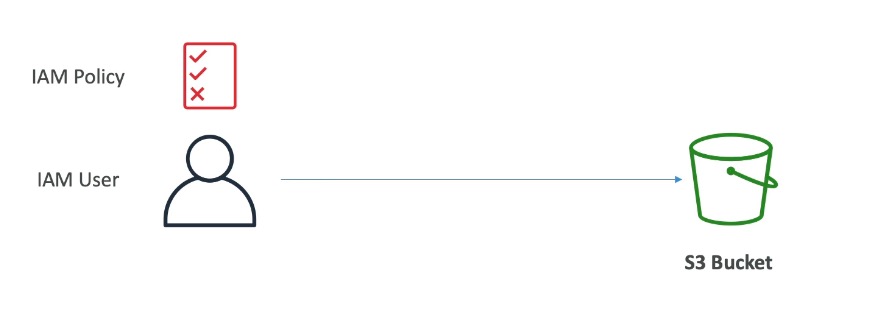
- User-based - IAM policies define which API calls a given IAM user can make.
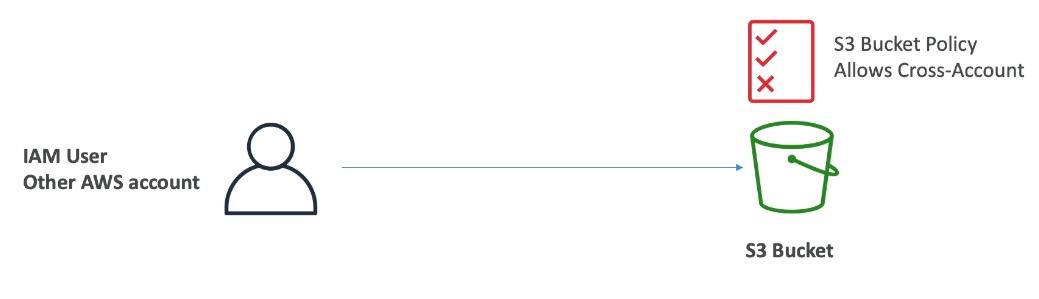
- Resource-based - Bucket policies (JSON, set from the S3 console, support cross-account access) and Object/Bucket ACLs (finer-grained, less common, can be disabled).
A principal is the identity making the request - an IAM user, role, or AWS account. An IAM principal can access an S3 object if either the principal’s own IAM permissions allow it or the resource policy (bucket policy) allows it - only one path needs to grant access - and there is no explicit Deny anywhere, since an explicit Deny always overrides any Allow.
Objects can also be encrypted using encryption keys - see KMS.
S3 Bucket Policies
JSON-based policies attached to a bucket, made up of:
- Resources - buckets and objects
- Effect - Allow/Deny
- Actions - the set of API calls to allow or deny
- Principal - the account or user the policy applies to
Common uses: grant public access to a bucket, force objects to be encrypted on upload, or grant cross-account access.
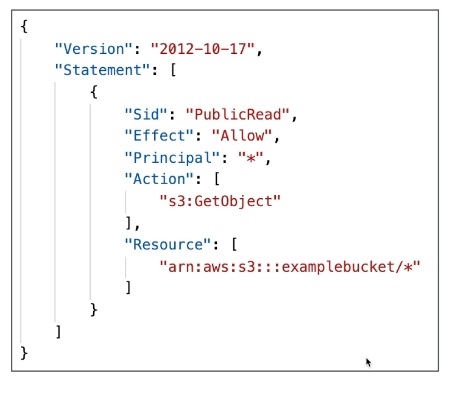
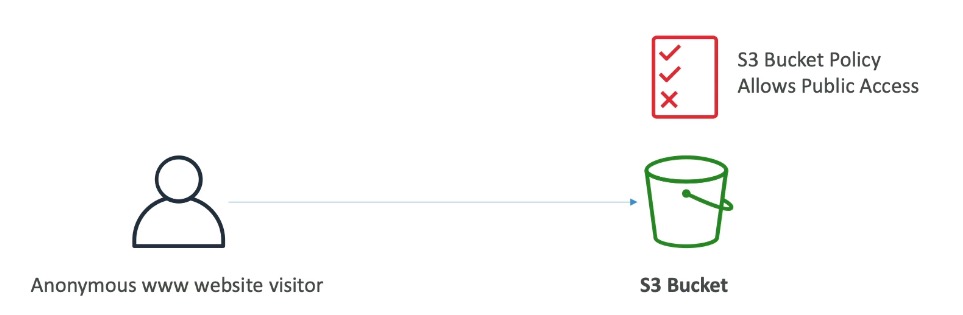
Access pattern examples:
- Public access → bucket policy
- IAM user access → IAM permissions
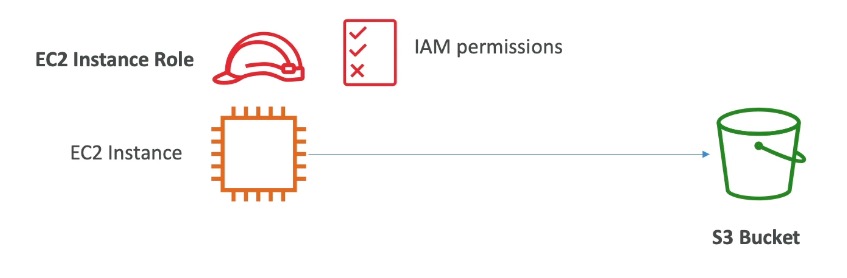
- EC2 instance access → IAM role attached to the instance
- Cross-account access → bucket policy
Block Public Access
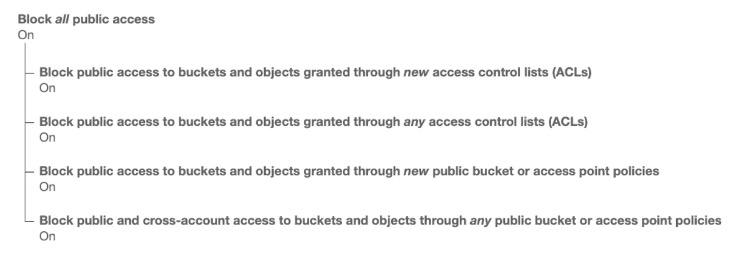
- Created to prevent accidental data leaks.
- If a bucket should never be public, leave these settings on.
- Can also be set at the account level if none of your buckets should ever be public.
Static Website Hosting
- S3 can serve a bucket’s contents as a static website directly over the internet.
- URL format depends on region:
http://bucket-name.s3-website-aws-region.amazonaws.com - A 403 Forbidden error usually means the bucket policy doesn’t allow public reads.
S3 website hosting vs. CloudFront
S3 website endpoints don’t support HTTPS or custom domains with a certificate. Plain S3 hosting is fine for quick, low-traffic, or dev sites, but production sites typically put CloudFront in front of the bucket for HTTPS, a custom domain, edge caching (lower latency globally), DDoS protection, and the ability to keep the bucket itself private. On the exam, “needs HTTPS” on a static site question is a strong signal the answer involves CloudFront.
Versioning
- Enabled at the bucket level; versions files so the same key gets version 1, 2, 3, etc. on overwrite.
- Best practice to enable - protects against unintended deletes (can restore a prior version) and enables easy rollback.
- Files uploaded before versioning was enabled get version
null. - Suspending versioning does not delete previously stored versions.
Replication (CRR & SRR)
- Requires versioning enabled on both source and destination buckets.
- Cross-Region Replication (CRR) - compliance, lower-latency access, replication across accounts.
- Same-Region Replication (SRR) - log aggregation, live replication between production and test accounts.
- Source and destination can be in different AWS accounts; copying is asynchronous and requires the right IAM permissions.
Replication gotchas
- Only new objects replicate after replication is enabled - existing objects need S3 Batch Replication (which also retries failed replications).
- Delete markers replicate only if that optional setting is on; deletions with a version ID never replicate, to prevent malicious deletes.
- Replication does not chain - if bucket 1 replicates to bucket 2, and bucket 2 replicates to bucket 3, objects created in bucket 1 do not reach bucket 3.
Lifecycle Rules
Automates moving or removing objects as they age, based on transition and expiration actions. Rules can target a prefix (e.g. s3://mybucket/mp3/*) or object tags (e.g. Department: Finance).
- Transition actions - move objects to a cheaper class after N days (e.g. Standard → Standard-IA after 60 days, → Glacier after 6 months).
- Expiration actions - delete objects after N days (e.g. expire access logs after 365 days, delete old versions once versioning is enabled, or clean up incomplete multi-part uploads).
Worked scenarios
- Thumbnails scenario: source images need instant access for 60 days then can tolerate a 6-hour wait; thumbnails are cheap to recreate and only kept 60 days. → Keep source images on Standard with a lifecycle rule to transition to Glacier after 60 days; put thumbnails on One Zone-IA with a lifecycle rule to expire (delete) them after 60 days.
- Deleted-object recovery scenario: deleted objects must be recoverable instantly for 30 days, then within 48 hours for up to 365 days. → Enable versioning so deletes become a hidden delete marker (recoverable immediately); transition noncurrent versions to Standard-IA, then to Glacier Deep Archive.
Storage Class Analysis
- Analyzes access patterns and recommends when to transition objects between Standard and Standard-IA (does not support One Zone-IA or Glacier).
- Report updates daily; takes 24-48 hours to start producing data.
- Good first step before writing or tuning lifecycle rules.
S3 Event Notifications
Notifications fire when specified events happen in a bucket (e.g. s3:ObjectCreated, s3:ObjectRemoved), letting other services react without polling.
- Delivered typically within seconds, occasionally up to a minute or more.
- Can send to SNS, SQS, or Lambda directly - each requires the destination to grant S3 permission via its own resource policy (SNS/SQS resource policy, Lambda resource policy).
- All events also flow into Amazon EventBridge, which unlocks advanced JSON filtering (by metadata, object size, name, etc.), multiple destinations (e.g. Step Functions, Kinesis Data Streams/Firehose) across 20+ target services, and EventBridge features like archive, replay, and reliable delivery.
S3 Performance
- S3 auto-scales to high request rates at ~100-200ms latency.
- Baseline per prefix in a bucket: 3,500 PUT/COPY/POST/DELETE or 5,500 GET/HEAD requests/second - no limit on the number of prefixes, so spreading keys across prefixes scales throughput.
- Multi-part upload - recommended above 100 MB, required above 5 GB; parallelizes the upload to speed up transfers.
- S3 Transfer Acceleration - routes uploads through the nearest AWS edge location to the target-region bucket for faster transfers; compatible with multi-part upload.
- S3 Byte-Range Fetches - request a specific byte range of an object to parallelize GETs, improve failure resilience, speed up downloads, or fetch only part of a file (e.g. just the header).
S3 Metadata & Tags
- User-defined metadata - key-value pairs attached at upload time; keys must be prefixed
x-amz-meta-and are stored lowercase; returned when the object is retrieved. - Object tags - up to 10 key-value pairs per object, useful for fine-grained permissions (tag-scoped access) and analytics (grouping via Storage Class Analysis).
- Neither metadata nor tags are searchable within S3 - for search, index them externally (e.g. in DynamoDB).
Storage Classes
| Class | Notes |
|---|---|
| S3 Standard | General purpose |
| S3 Standard-IA | Infrequent Access |
| S3 One Zone-IA | Infrequent Access, single AZ |
| S3 Glacier Instant Retrieval | Archive, millisecond access |
| S3 Glacier Flexible Retrieval | Archive, minutes to hours |
| S3 Glacier Deep Archive | Archive, cheapest, hours |
| S3 Intelligent-Tiering | Automatic tiering |
Objects can move between classes manually or via S3 lifecycle configurations.
- Durability: 11 9’s (99.999999999%) across multiple AZs - the same for every storage class.
- Availability: how readily a service responds when needed - this does vary by class.
General Purpose - 99.99% availability, low latency/high throughput, sustains 2 concurrent facility failures. Use cases: big data analytics, mobile/gaming apps, content distribution.
Infrequent Access - cheaper than Standard, for data accessed rarely but needed quickly when it is:
- Standard-IA - 99.9% availability. Use cases: disaster recovery, backups.
- One Zone-IA - single AZ (data is lost if that AZ is destroyed), 99.5% availability. Use cases: secondary backup copies of on-prem data, or data you can recreate.
Glacier (low-cost archive/backup; you pay storage + retrieval cost):
- Instant Retrieval - millisecond retrieval, good for data accessed ~once a quarter. Min storage duration 90 days.
- Flexible Retrieval - Expedited (1-5 min), Standard (3-5 hrs), Bulk (5-12 hrs, free). Min storage duration 90 days.
- Deep Archive - long-term storage. Standard (12 hrs), Bulk (48 hrs). Min storage duration 180 days.
Intelligent-Tiering - small monthly monitoring/tiering fee, no retrieval charges, auto-moves objects between tiers based on usage:
- Frequent Access (default) → Infrequent Access (30 days unused) → Archive Instant Access (90 days unused, automatic)
- Archive Access (optional, configurable 90-700+ days) and Deep Archive Access (optional, configurable 180-700+ days)
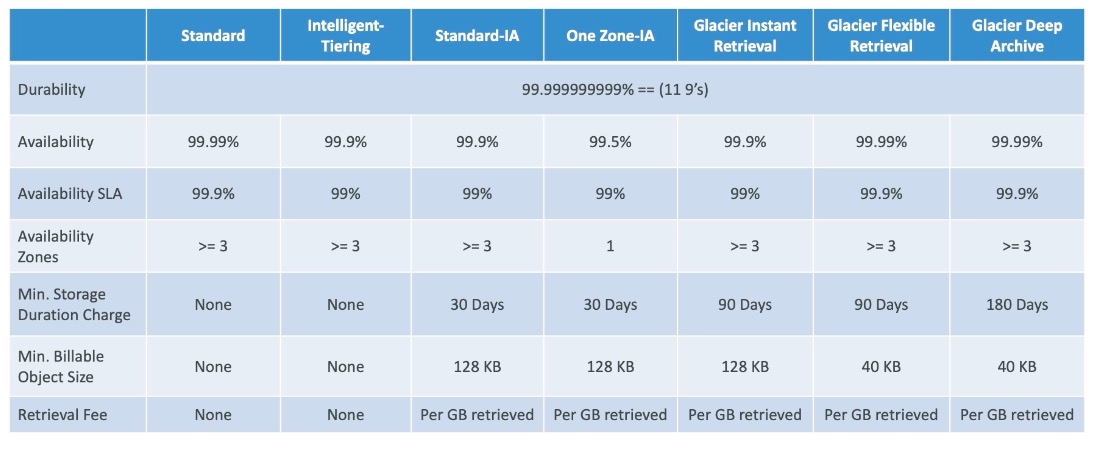
Standard-IA availability
Standard-IA availability is 99.9%, not 99.99% - easy to misremember since it’s one 9 lower than S3 Standard. One Zone-IA drops further to 99.5%.
Configuration & Limits
- Max object size: 50 TB. Multi-part upload recommended above 100 MB, required above 5 GB.
- Up to 10 tags per object.
- Durability is 11 9’s for every storage class; availability varies (see table above).
- Glacier minimum storage durations: 90 days (Instant/Flexible Retrieval), 180 days (Deep Archive) - deleting early still incurs the full minimum charge.
- Baseline request rate: 3,500 PUT/COPY/POST/DELETE or 5,500 GET/HEAD requests/second per prefix - no limit on the number of prefixes.
- Storage Class Analysis: 24-48 hours to start producing data; recommends between Standard and Standard-IA only.
Exam Tips & Gotchas
Frequently confused
- IAM policy vs. bucket policy: IAM policies are attached to a user/role (user-based); bucket policies are attached to the bucket itself (resource-based) and are the only way to grant cross-account access without the other account assuming a role.
- Access requires (IAM allows or bucket policy allows) and no explicit Deny.
- Versioning must be enabled on both source and destination buckets before replication works.
- Replication is one-hop only - it never chains across a third bucket.
- Storage Class Analysis doesn’t cover One Zone-IA or Glacier - don’t expect its recommendations there.
- Metadata and tags are never searchable in S3 itself - a “find objects by tag” question implies an external index like DynamoDB.
Integrations
- CloudFront - adds HTTPS, custom domains, and edge caching in front of an S3 static website or bucket.
- IAM - user policies and roles (e.g. EC2 instance roles) govern who/what can call S3 APIs.
- KMS - provides the encryption keys used to encrypt objects at rest.
- EventBridge - receives every S3 event notification, enabling advanced filtering and fan-out to 20+ target services.
- SNS / SQS / Lambda - direct targets for S3 event notifications; each requires a resource policy granting S3 permission to invoke it.
- DynamoDB - common external index for making S3 object metadata/tags searchable.
Review Questions
What determines the AWS region an S3 bucket lives in, and does that ever change?
A: A bucket is created in a specific region at creation time and stays there - S3 appears global via its unified API/console, but each bucket is regional.
What is the key of the object at
s3://my-bucket/my_folder1/another_folder/my_file.txt?A:
my_folder1/another_folder/my_file.txt- the full path after the bucket name. There’s no real folder hierarchy; the key is just a string with/characters in it.
Under what condition can an IAM principal access an S3 object?
A: If the principal’s own IAM permissions allow it OR a resource policy (bucket policy) allows it, AND there is no explicit Deny anywhere.
Why would you put CloudFront in front of an S3 static website instead of using the S3 website endpoint directly?
A: S3 website endpoints don’t support HTTPS or custom domain certificates. CloudFront adds HTTPS, custom domains, edge caching for lower latency, DDoS protection, and lets you keep the bucket private.
After enabling versioning, what version ID do pre-existing objects have?
A:
null- only objects uploaded after versioning is enabled get sequential version IDs.
If bucket A replicates to bucket B, and bucket B replicates to bucket C, do objects created in A ever reach C?
A: No - S3 replication does not chain.
Which storage class has the lowest availability, and why?
A: S3 One Zone-IA, at 99.5% - because it stores data in only one Availability Zone, so it’s lost entirely if that AZ is destroyed.
Storage Class Analysis can recommend transitions to which classes, and which does it not support?
A: It recommends between Standard and Standard-IA; it does not support One Zone-IA or Glacier.
Where do S3 event notifications end up if you want advanced filtering or many possible destinations?
A: Amazon EventBridge - all S3 events flow there, enabling JSON-based filtering and delivery to 20+ AWS services.
What's the baseline S3 request rate per prefix, and how do you scale beyond it?
A: 3,500 PUT/COPY/POST/DELETE or 5,500 GET/HEAD requests/second per prefix - since there’s no limit on the number of prefixes, spread objects across more prefixes to scale further.
Can you search S3 objects by their metadata or tags?
A: No - neither is searchable in S3 directly; you need an external index like DynamoDB.