IAM
Summary: IAM is AWS’s global service for controlling who can access what in your account - it manages users, groups, roles, and permission policies for both humans and AWS services. IAM users/groups are internal (developers, CI/CD pipelines), NOT end-user customers of your app (that’s Cognito). IAM is foundational: every AWS service interaction goes through it.
Key Concepts
Users & Groups
- Root account is created by default with unrestricted access; only use it for initial account setup, then lock it away
- Users are people (or services) within your org; can belong to multiple groups
- Groups only contain users, not other groups; a user doesn’t have to belong to any group
Policies
- Users or groups are assigned JSON documents called policies
- Policies define what actions are allowed or denied on which resources
- If a user has both group policies and a direct (inline) policy, all are merged (union); explicit Deny always overrides any Allow
- Apply the least privilege principle: don’t grant more permissions than a user needs
Policy Inheritance
- Inline policy: a policy attached directly to a single user with no group
- Users inherit all policies from every group they belong to
- Ex: Erwin is in Group A, Baldwin is in Group B, both are also in Group C -> Group C’s policy is inherited by both
Policy Structure
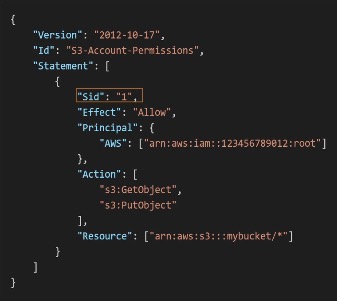
- Version: policy language version (always
"2012-10-17") - Id: optional policy identifier
- Statement: one or more permission rules, each with:
- Sid: optional statement identifier
- Effect:
AlloworDeny - Principal: account/user/role this policy applies to, identified by an ARN (Amazon Resource Name) (e.g.
arn:aws:iam::123456789012:user/Alice) - Action: actions to allow or deny (format:
service:Action, e.g.s3:GetObject,ec2:StartInstances,iam:CreateUser;*wildcards all actions) - Resource: resources the actions apply to, by ARN (e.g.
arn:aws:s3:::my-bucket/*, a specific EC2 instance ARN, or*for all) - Condition (optional): when the policy is in effect - e.g. restrict by IP range, require MFA, match a specific S3 path prefix
IAM Roles
- AWS services sometimes need to perform actions on your behalf - they can’t use a username/password
- IAM Roles assign permissions to AWS entities (services, not people)
- Common roles: EC2 Instance Roles, Lambda Function Roles, Roles for CloudFormation
Configuration & Limits
How Users Access AWS
- AWS Management Console - web GUI; protected by password + MFA
- AWS CLI - direct access to AWS public APIs via terminal; protected by access keys
- AWS CloudShell: browser-based CLI that uses your Console session’s credentials; no local setup needed
- AWS SDK - programmatic access from your application code; protected by access keys
Access keys are generated through the Console; users manage their own - never share them
Password Policy & MFA
- Password policy enforces minimum standards across all IAM users (length, complexity, expiry, reuse prevention); necessary because a weak password on any user account exposes your entire AWS infrastructure
- MFA device options:
- Virtual MFA device - authenticator app (e.g. Google Authenticator); multiple tokens on one device
- U2F Security Key - physical USB-like device (e.g. YubiKey); one key supports multiple root and IAM users
- Hardware Key Fob MFA Device
- Hardware Key Fob MFA Device for AWS GovCloud
Exam Tips & Gotchas
Explicit Deny always wins
An explicit Deny overrides any Allow, no matter where it comes from (group policy, inline policy, etc.). This is the single most tested IAM rule.
- Root account = break-glass only; create an IAM admin user for daily work
- One physical person = one IAM user - never share credentials
- Attach permissions to groups, not individual users - easier to manage at scale
- IAM Roles are for services, not people; EC2, Lambda, CloudFormation each get a role
- The AWS Console GUI writes JSON policies under the hood - they’re the same thing
- Access keys are for CLI/SDK only; never hardcode them in source code
Don't confuse: Credentials Report vs Last Accessed
- Credentials Report = account-wide audit (who has MFA? whose keys are stale?)
- Last Accessed = per-user least-privilege enforcement (what permissions are actually being used?)
Integrations
- EC2 - EC2 Instance Roles let EC2 call other AWS services without hardcoded credentials
- Lambda - Lambda Function Roles grant Lambda access to services like DynamoDB and S3
- CloudFormation - Roles allow CloudFormation to create/modify resources on your behalf
- Cognito - handles end-user (customer) identity; IAM handles internal (developer/service) identity
Shared Responsibility Model
- AWS: IAM infrastructure, global availability, vulnerability analysis, compliance validation
- You: managing users/groups/roles/policies, enabling MFA on all accounts, rotating access keys, auditing permissions with IAM tools, analyzing access patterns
Review Questions
What does IAM stand for and what does it do?
A: Identity and Access Management - AWS’s global service for controlling who can access what (manages users, groups, roles, and policies)
Are IAM users your app's customers or internal identities?
A: Internal - developers, teammates, CI/CD pipelines; end-user customers use Cognito, not IAM
What happens when a user has both a group policy and an inline policy?
A: Both are merged (union); explicit Deny anywhere always overrides any Allow
What is an IAM Role and how does it differ from a user?
A: Permissions assigned to an AWS service (not a person) so it can call other services on your behalf; roles don’t have long-term credentials, they’re assumed temporarily
What is the format for an IAM policy Action field?
A: service:Action (e.g. s3:GetObject, ec2:StartInstances, iam:CreateUser); * wildcards all actions
What is an ARN?
A: Amazon Resource Name - a globally unique identifier for an AWS resource (e.g. arn:aws:iam::123456789012:user/Alice)
What is an inline policy?
A: A policy attached directly to a single user who belongs to no group
What are the three ways users can access AWS and how is each protected?
A: Console (password + MFA), CLI (access keys), SDK (access keys)
What is the IAM Credentials Report and when would you use it?
A: Account-level audit report listing all users and credential status (MFA, key age, password age); use it to find dormant accounts, users without MFA, or unrotated keys
What is IAM Last Accessed used for?
A: Enforcing least privilege - shows which permissions a user actually used vs. what they were granted, so you can safely revoke unused ones
Is IAM regional or global?
A: Global - users, groups, roles, and policies aren’t tied to a region, and you never pick a region when using IAM. Note “global” means outside the region model, not “replicated into every region”
Name the elements of an IAM policy JSON document.
A: Version (always
2012-10-17), optional Id, and one or more Statements - each with optional Sid, Effect (Allow/Deny), Principal (who, by ARN), Action (service:Action), Resource (by ARN), and optional Condition
What can a policy
Conditionblock restrict on?A: When the statement applies - e.g. restrict by source IP range, require MFA, match a specific S3 path prefix, or check request tags
What are the three types of IAM policies?
A: AWS managed (pre-built and maintained by AWS), customer managed (you author it, reusable across identities), and inline (embedded in a single user/group/role, one-to-one, deleted with it)
Can an IAM group contain another group? Must a user belong to a group?
A: No - groups contain users only, never other groups. And no - a user can belong to zero, one, or multiple groups
How many IAM roles can an EC2 instance have attached at once?
A: One. An instance has a single instance profile, so you attach one role and grant it all the permissions that instance needs
What is STS and how does it relate to roles?
A: Security Token Service - it issues temporary credentials. When an entity “assumes a role” (
sts:AssumeRole), STS hands back short-lived keys, which is why roles have no long-term credentials the way users do
What are the MFA device options in IAM?
A: Virtual MFA device (authenticator app like Google Authenticator - multiple tokens per device), U2F security key (e.g. YubiKey - one key supports multiple root and IAM users), hardware key fob, and hardware key fob for AWS GovCloud
Why enforce an account-wide password policy?
A: A weak password on any single IAM user exposes the whole AWS account. The policy enforces minimum length, complexity, expiry, and reuse prevention across all users
What is AWS CloudShell?
A: A browser-based CLI that runs with your Console session’s credentials - no local install or access key configuration needed
Under the shared responsibility model, what does AWS own vs. what do you own for IAM?
A: AWS owns the IAM infrastructure, global availability, vulnerability analysis, and compliance validation. You own managing users/groups/roles/policies, enabling MFA, rotating access keys, and auditing permissions
Review Log
- 2026-07-18 | Good | Gaps: IAM acronym expansion, inline policy exact definition (missed “no group” condition), confused access methods with account types (Console/CLI/SDK vs root/IAM user), EC2 can only have one role at a time | Solid: policy inheritance + union, deny always wins, role vs user distinction, ARN, Last Accessed vs Credentials Report, least privilege rationale | Next session: probe access methods, EC2 single role limit, and the three policy types (AWS managed vs customer managed vs inline)