EC2 (Elastic Compute Cloud)
Summary: EC2 is AWS’s Infrastructure as a Service (IaaS) offering: virtual servers where you configure and control everything from the OS up, while AWS manages and provisions the underlying physical server, hypervisor, networking, and data center. It’s the foundational compute service and shows up across almost every exam domain.
Key Concepts
EC2 mainly gives you the capability of:
- Renting virtual machines (EC2)
- Storing data on virtual drives (EBS) - see EBS
- Distributing load across machines (ELB) - see ELB
- Scaling services using an Auto Scaling Group (ASG) - see ASG
EC2 vs ECS: ECS (ECS) runs Docker containers, not full VMs. EC2 gives you a whole virtual machine; ECS orchestrates containers (which can run on EC2 instances or on serverless Fargate). Different layer of abstraction.
Sizing & Configuration Options
- OS (Linux, Windows, macOS)
- CPU (compute power and number of cores)
- RAM
- Storage space:
- Network-attached (EBS & EFS) - the drive isn’t physically inside the server; it’s connected over the network. This means it can be detached from one instance and reattached to another, and it persists independently of the instance.
- Hardware / local (EC2 Instance Store) - physically attached to the host; very fast but ephemeral (lost when the instance stops).
- Network card - the instance’s virtual network interface (ENI). It determines network bandwidth/speed and holds the instance’s IP addresses (public and private). Larger instance types get faster network cards.
- Firewall rules - the security group
- Bootstrap script (runs at first launch) - EC2 User Data
EC2 User Data
- Bootstrapping = launching commands automatically when the machine first starts.
- The User Data script runs only once, at the instance’s first boot, and runs as the root user.
- Used to automate boot tasks such as:
- installing updates
- installing software
- downloading files / setup
- etc.
Instance Types
You choose an instance type optimized for your workload. AWS naming convention, e.g. m5.2xlarge (a real instance type):
m= instance class5= generation2xlarge= size within the class
| Type | Optimized for | Example workloads |
|---|---|---|
| General Purpose | Balance of compute, memory, networking | Web servers, code repos, diverse workloads |
| Compute Optimized | High-performance processors | Batch processing, media transcoding, HPC, scientific modeling & ML, dedicated gaming servers |
| Memory Optimized | Processing large data sets in memory | High-performance relational/non-relational DBs, distributed web-scale caches, in-memory DBs, real-time big-data processing |
| Storage Optimized | High sequential read/write to large local datasets | OLTP systems, relational & NoSQL DBs, in-memory DB cache (e.g. Redis), data warehousing, distributed file systems |
OLTP (Online Transaction Processing) - workloads with many small, fast read/write transactions. Examples: e-commerce checkouts, banking/ATM transactions, ticket booking, order entry. (Contrast with OLAP, which is analytics/reporting over large datasets.)
Security Groups (SG)
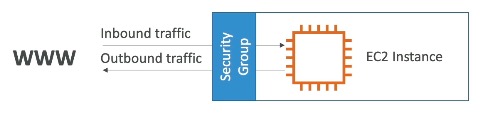
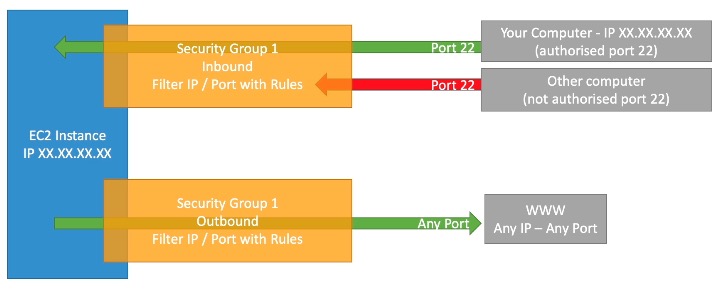
- Act as a firewall on your EC2 instances - they control what traffic is allowed in (inbound) and out (outbound).
- Contain only allow rules (you cannot write explicit deny rules).
- Can reference traffic by IP range or by another security group.
- They regulate:
- access to ports
- authorized IP ranges (IPv4 and IPv6)
- inbound traffic → blocked by default
- outbound traffic → allowed by default (the instance can initiate connections out to any destination, e.g. any website, assuming it has a route to the internet)
- One security group can be attached to multiple instances, and one instance can have multiple SGs.
- Locked to a region / VPC combination.
- Lives outside the EC2 instance → if traffic is blocked, the instance never even sees it.
- Good practice: keep a separate SG just for SSH access.
Networking terms
- IP (Internet Protocol address): a numeric label identifying a device on a network so traffic can be routed to it (like a mailing address for a machine).
- IPv4: older 32-bit addresses (e.g.
192.168.0.1), ~4.3 billion total, running out. Used for identifying/routing to the vast majority of internet hosts today.- IPv6: newer 128-bit addresses (e.g.
2001:0db8::1), effectively unlimited. Used for the same job as IPv4 (addressing/routing) but solves IPv4 address exhaustion; increasingly required as the internet grows.- VPC (Virtual Private Cloud): your own isolated private network inside AWS where instances live; you control its IP range, subnets, and routing. See VPC fundamentals.
Why security groups exist (if the OS already has a firewall)
A security group lives outside the instance, at the AWS network/hypervisor layer. So blocked traffic never reaches the VM - it’s a defense layer independent of the guest OS, centrally managed, reusable across many instances, and it can’t be disabled by someone who compromises the OS. OS-level firewalls still exist; SGs are the AWS-native, always-on layer.
Referencing other security groups
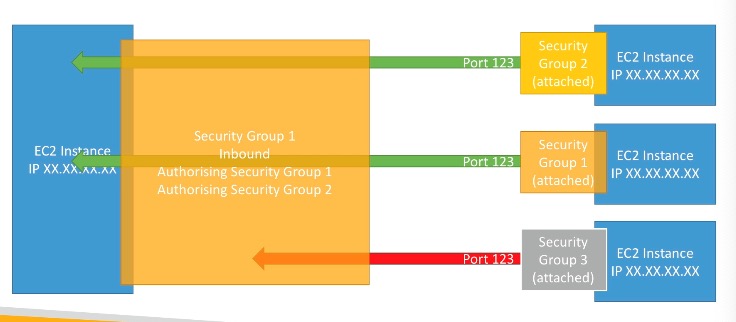
A SG rule can authorize another security group instead of an IP range. “Authorizing SG-A” means: any instance that belongs to SG-A is allowed to send the specified traffic to instances in this SG.
Why do this? So access is based on group membership, not IP addresses. As instances scale up/down and their IPs change, the rule keeps working because it targets the group. Example: authorize the load balancer’s SG to reach your app’s SG.
Example: if EC2 instance X’s SG authorizes SG-1 and SG-2 for inbound, then any EC2 instance carrying SG-1 and/or SG-2 can connect to X.
Classic Ports to Know
A port is a numbered channel on a machine that identifies a specific service/application (e.g. web traffic vs SSH). “Classic ports” are well-known, internet-standard port numbers - not AWS-specific, so you just memorize them. Security group rules are written per port, so exam scenarios test them directly (“can’t SSH in” → check 22; “can’t reach the site” → check 80/443; “can’t RDP” → check 3389).
| Port | Protocol | Use |
|---|---|---|
| 22 | SSH | Log into a Linux instance |
| 21 | FTP | Upload files into a file share |
| 22 | SFTP | Upload files securely over SSH |
| 80 | HTTP | Access unsecured websites |
| 443 | HTTPS | Access secured websites |
| 3389 | RDP | Log into a Windows instance |
Connection diagnostics:
- Time-out → security group issue (traffic is being blocked).
- Connection refused → the application itself errored or isn’t launched.
EC2 Instance Purchasing Options
A few terms recur across the options below:
-
Region & Availability Zone (AZ): a Region is a geographic area containing multiple AZs - each AZ is one or more discrete data centers with independent power/networking, so they’re isolated from each other’s failures. You spread resources across AZs for fault tolerance.
-
Scope (Regional vs Zonal): how broadly a reservation applies. Regional = across all AZs in the Region (more flexible); Zonal = tied to one specific AZ, which also reserves capacity there.
-
Tenancy: how much your instance shares physical hardware - Default/Shared (share a host with other customers) → Dedicated Instance (hardware dedicated to your account, no placement control) → Dedicated Host (a whole physical server you can see and control).
-
Upfront payment: how much of a reservation you pay at the start - All upfront (biggest discount), Partial upfront, or No upfront (smallest discount).
-
On-Demand - short, un-interruptible workloads; pay per second, no commitment.
- Pay only for what you use; highest cost but no upfront payment.
- Best when you can’t predict app behavior and need reliability short-term.
-
Reserved Instances (RI) - steady, long-running workloads (think databases).
- Cheaper than On-Demand; you reserve specific attributes (instance type, region, tenancy, OS).
- Term: 1 year (discount) or 3 years (bigger discount).
- Payment: no upfront / partial upfront / all upfront.
- Scope: Regional or Zonal (see terms above).
- Can buy/sell in the Reserved Instance Marketplace.
- Convertible RI - can change instance type, family, OS, scope, and tenancy in exchange for a smaller discount.
-
Savings Plans (1 or 3 years) - commit to an amount of usage (e.g. $10/hour) for a discount.
- Usage beyond the commitment is billed at On-Demand price.
- Locked to a specific instance family & region.
- Flexible across: instance size (e.g. m5.xlarge → m5.2xlarge), OS, and tenancy.
-
Spot Instances - cheapest option (up to 90% off), but you can lose them anytime.
- You set a max price you’ll pay. The spot price floats with supply/demand. While spot price ≤ your max, the instance runs at the current spot price. If spot price rises above your max, AWS reclaims your instance.
- The most cost-efficient option in AWS.
- Best for failure-tolerant work: batch jobs, image processing, distributed workloads. Not for critical jobs or databases.
-
Dedicated Hosts - book an entire physical server.
- You get visibility into and control over sockets, cores, and instance placement.
- Supports per-socket / per-core bring-your-own-license (BYOL) software.
- Purchasing: On-Demand (per second) or Reserved (1/3 yr, no/partial/all upfront).
- Most expensive option; for strict compliance / regulatory needs or complex licensing.
-
Dedicated Instances - run on hardware dedicated to your account, but no visibility or placement control (can move to different hardware on stop/start).
-
Capacity Reservations - reserve capacity in a specific AZ for any duration.
- Guarantees EC2 capacity is available when you launch.
- No time commitment and no discount - you pay On-Demand rate whether or not you run instances.
- Combine with Regional RIs / Savings Plans to get billing discounts.
- Best when you must guarantee capacity in a specific AZ (e.g. DR, a known burst).
Dedicated Host vs Dedicated Instance (common exam trap)
- Dedicated Host → visibility/control over sockets, cores, placement; supports per-core/per-socket BYOL. Trigger words: “existing licenses”, “per-core licensing”, “placement control”.
- Dedicated Instance → dedicated hardware, but no placement control/visibility; cheaper.
Purchasing options - resort analogy
- On-Demand: show up and stay whenever, pay full price.
- Reserved: plan ahead for a long stay, get a discount.
- Savings Plans: pay a set amount per hour for a period, stay in any room type.
- Spot: bid on empty rooms; highest bidder keeps them but can be kicked out anytime.
- Dedicated Hosts: book an entire building of the resort.
- Capacity Reservations: reserve a room for a period and pay full price even if you never show up.
Configuration & Limits
- User Data runs once, at first boot, as root.
- Public IPv4 is dynamically assigned and changes on stop/start; private IPv4 is fixed for the instance’s lifetime. Use an Elastic IP for a fixed public IP.
- Security groups: allow rules only, inbound deny-by-default, outbound allow-by-default, scoped to region/VPC.
Exam Tips & Gotchas
High-value traps
- Time-out → SG issue; connection refused → app issue.
- Spot = failure-tolerant only (never databases/critical).
- Dedicated Host for BYO licenses & placement control; Dedicated Instance otherwise.
- Capacity Reservation guarantees capacity but gives no discount.
- Public IPv4 changes on stop/start unless you use an Elastic IP.
- IMDSv2 requires a session token before metadata reads - blocks SSRF attacks that could leak instance role credentials.
- An EC2 instance can only have one IAM role attached at a time.
Integrations
- EBS - network-attached block storage that persists independently of the instance.
- ELB - distributes incoming traffic across multiple instances.
- ASG - automatically scales the number of instances up/down.
- VPC fundamentals - the private network EC2 instances run inside; SGs are scoped to a VPC.
- ECS / Fargate - run containers on or alongside EC2.
Review Questions
In one sentence, what is EC2?
A: IaaS virtual servers where you control the OS and up, while AWS manages/provisions the underlying physical hardware.
Why does an instance's public IPv4 change on stop/start but its private IPv4 doesn't? How do you get a fixed public IP?
A: Public IPv4 is dynamically assigned from AWS’s pool each start; private IPv4 is fixed for the instance’s life. Use an Elastic IP for a stable public IP.
What's the difference between network-attached storage (EBS/EFS) and the EC2 Instance Store?
A: EBS/EFS are network drives that persist independently and can be detached/reattached; Instance Store is local, faster, but ephemeral (lost on stop).
Do security groups have deny rules? What are the inbound/outbound defaults?
A: No deny rules (allow-only). Inbound blocked by default; outbound allowed by default.
Why reference another security group in a rule instead of an IP?
A: So access follows group membership, not IPs - rules keep working as instances scale and IPs change.
Why do you need a security group if the OS has its own firewall?
A: SGs live outside the instance at the AWS layer, so blocked traffic never reaches the VM; centrally managed, reusable, OS-independent.
A user gets a time-out connecting to their app vs a connection-refused error. What does each indicate?
A: Time-out → security group blocking traffic; connection refused → app errored or not running.
Which ports are SSH, RDP, HTTP, HTTPS, FTP, SFTP?
A: SSH 22, RDP 3389, HTTP 80, HTTPS 443, FTP 21, SFTP 22.
How do Spot Instances decide whether your instance keeps running?
A: You set a max price; while spot price ≤ max it runs at the spot price; if spot price exceeds your max, AWS reclaims it. Failure-tolerant workloads only.
Dedicated Host vs Dedicated Instance - key difference for the exam?
A: Host gives socket/core/placement control and supports per-core BYO licenses; Instance is dedicated hardware with no placement control/visibility.
What do Capacity Reservations guarantee, and what do they cost?
A: Guaranteed capacity in a specific AZ with no commitment, but no discount - you pay On-Demand whether or not you run instances.
What is Reserved Instance scope (Regional vs Zonal)?
A: Regional = discount across all AZs in the region (flexible); Zonal = reserves capacity in one specific AZ.
Decode the instance type
m5.2xlarge.A:
m= instance class,5= generation,2xlarge= size within that class.
Name the four instance type families and a workload for each.
A: General Purpose (web servers, diverse workloads), Compute Optimized (batch, media transcoding, HPC, gaming servers), Memory Optimized (large in-memory datasets, high-perf databases, in-memory caches), Storage Optimized (OLTP, NoSQL/relational DBs, data warehousing, distributed file systems).
What is OLTP, and what's it contrasted with?
A: Online Transaction Processing - many small, fast read/write transactions (e-commerce checkout, banking, ticket booking). Contrast with OLAP (analytics/reporting over large datasets).
When does EC2 User Data run, how often, and as which user?
A: At the instance’s first boot only (runs once), as the root user. Used for bootstrapping - updates, installing software, downloading setup files.
EC2 vs ECS - what's the difference in abstraction level?
A: EC2 gives you a whole virtual machine. ECS orchestrates Docker containers, which can run on EC2 instances or on serverless Fargate. Different layers, not competitors.
With Savings Plans, what's locked and what's flexible?
A: Locked to a specific instance family and region. Flexible across instance size, OS, and tenancy. You commit to a $/hour amount; usage beyond the commitment is billed at On-Demand.
What is a Convertible Reserved Instance?
A: An RI that lets you change instance type, family, OS, scope, and tenancy in exchange for a smaller discount than a standard RI.
What determines an EC2 instance's network bandwidth, and what else does that component hold?
A: The network card / ENI (Elastic Network Interface) - the instance’s virtual network interface. It sets network speed and holds the instance’s public and private IP addresses. Larger instance types get faster network cards.
How should an EC2 instance get credentials to call other AWS services?
A: An IAM instance role (instance profile) - credentials are delivered and rotated automatically via instance metadata. Never hardcode access keys. An instance can only have one role attached at a time.
What is the EC2 Instance Metadata Service endpoint, and why does IMDSv2 exist?
A:
http://169.254.169.254/latest/meta-data/- a link-local address only reachable from the instance itself. IMDSv2 requires a session token obtained via aPUTrequest before any metadata read, which blocks SSRF attacks that could otherwise trick an app into leaking the instance’s role credentials.
What survives a reboot vs. a stop/start on EC2?
A: Reboot - instance store data and the public IPv4 both survive. Stop/start - instance store data is lost and the public IPv4 changes (unless an Elastic IP is attached). The private IPv4 never changes.
Review Log
- 2026-07-25 | Hard | Gaps: IaaS classification (said PaaS), no deny rules in SGs, time-out vs connection-refused (had them flipped), spot instance pricing mechanism (confused instance activity with market price), port numbers not memorized, Dedicated Host vs Instance, Capacity Reservations | Solid: ephemeral nature of Instance Store, outbound SG default, scaling motivation for SG references, public IP changes on stop/start | Next session: focus on ports (cold recall), SG allow-only model, time-out vs connection-refused, spot pricing, and Dedicated Host trigger words
- 2026-07-26 | Hard | Gaps: port numbers (significant misses across the board), time-out vs connection-refused (still flipped - connection refused = app issue, not instance down), Spot termination mechanism (confused with overage billing), Instance Store vs EBS/EFS (missed network-attached/portability angle), Capacity Reservation AZ specificity and On-Demand cost detail, RI Regional vs Zonal capacity reservation distinction | Solid: IaaS definition (closed from last session), SG allow-only model (closed), Dedicated Host vs Instance core distinction, Elastic IP, SG inbound/outbound defaults, SG group referencing rationale | Next session: drill ports cold (22/21/80/443/3389), time-out vs connection-refused (hammer until automatic), Spot termination model, RI Regional vs Zonal capacity nuance
- 2026-07-30 | Good | Gaps: SSH/RDP ports still needed hints (SSH=SFTP port link helped), time-out vs connection-refused flipped again before self-correcting, Instance Store misdescribed as in-memory (it’s local disk), conflated SG allow-only model with NACL deny/override behavior, initial SG-reference answer focused on static IPs rather than group-membership mechanism | Solid: Spot termination mechanism (closed), Dedicated Host vs Instance, Capacity Reservations (guarantee vs discount), RI Regional vs Zonal scope (closed), SG-vs-OS-firewall containment rationale, EC2 IaaS definition | Next session: drill ports to cold recall, time-out vs connection-refused reflex, Instance Store = local disk not RAM, SG vs NACL distinction (allow-only vs allow+deny/ordered)