Elastic Load Balancing (ELB) & Auto Scaling Groups (ASG)
Summary: ELB distributes incoming traffic across multiple targets (EC2s, Lambda, containers) and routes away from unhealthy instances. ASG automatically adds or removes EC2 instances based on load. Together they form the backbone of scalable, highly available architectures on AWS.
Scalability & High Availability
Scalability means a system can handle greater loads by adapting. Two kinds:
- Vertical scaling - increase the size of the instance (bigger CPU, more RAM). Common for non-distributed systems like databases. Has an upper limit.
- Horizontal scaling (aka elasticity) - increase the number of instances. Implies distributed systems. Common for web apps and modern cloud architectures.
High availability (HA) means running your application in at least 2 AZs so it survives a data center loss. Usually paired with horizontal scaling, but they’re distinct goals - you can scale without HA (one big server that grows but has no redundancy), and you can have HA without scaling (two identical small servers with no auto-growth).
Active vs Passive HA:
- Active - all instances handle traffic simultaneously (e.g., load-balanced EC2s across AZs)
- Passive - a standby sits idle and only takes over on primary failure (e.g., RDS Multi-AZ standby)
What is Load Balancing?
A load balancer forwards incoming traffic to multiple downstream servers (e.g., EC2 instances). Benefits:
- Spreads load across multiple downstream instances
- Exposes a single DNS endpoint to your application
- Seamlessly handles downstream instance failures
- Performs regular health checks on instances
- Provides SSL termination (HTTPS)
- Enforces stickiness with cookies
- High availability across AZs
- Separates public from private traffic
Elastic Load Balancer (ELB)
ELB is AWS’s managed load balancer - AWS handles provisioning, upgrades, maintenance, and availability. Integrates with EC2, EC2 Auto Scaling Groups, ECS, ACM, CloudWatch, Route 53, WAF, and Global Accelerator.
Health Checks
The load balancer pings a specific port and route (e.g., /health on port 80) on each instance. If the response is not HTTP 200, the instance is marked unhealthy and traffic stops routing to it.
Types of Load Balancers
Classic Load Balancer is deprecated and not tested on the exam. Know these three:
| LB Type | Layer | Protocols | Key Use Case |
|---|---|---|---|
| Application Load Balancer (ALB) | Layer 7 (Application) | HTTP, HTTPS, WebSocket | Content-based routing, microservices |
| Network Load Balancer (NLB) | Layer 4 (Transport) | TCP, TLS, UDP | High performance, static IP, whitelisting |
| Gateway Load Balancer (GLB) | Layer 3 (Network) | IP Protocol (GENEVE port 6081) | 3rd-party virtual appliances (firewalls, IDS) |
OSI layers relevant to ELB: Layer 3 (Network - IP), Layer 4 (Transport - TCP/UDP), Layer 7 (Application - HTTP/HTTPS). You don’t need to memorize all 7 for the exam - just these three.
TCP, TLS, UDP:
- TCP - reliable, ordered, connection-based. Guarantees delivery via a handshake. Used for HTTP, databases.
- UDP - fast, connectionless, no delivery guarantee. Low overhead. Used for video streaming, gaming, DNS.
- TLS - not a transport protocol; it’s an encryption layer on top of TCP. TLS is the newer, more secure successor to SSL (SSL is deprecated). Provides the “S” in HTTPS.
ELBs can be internal (private) - only accessible within your VPC, used for routing between internal services - or external (public) - has a public DNS and handles internet-facing traffic.
Load Balancer Security Groups
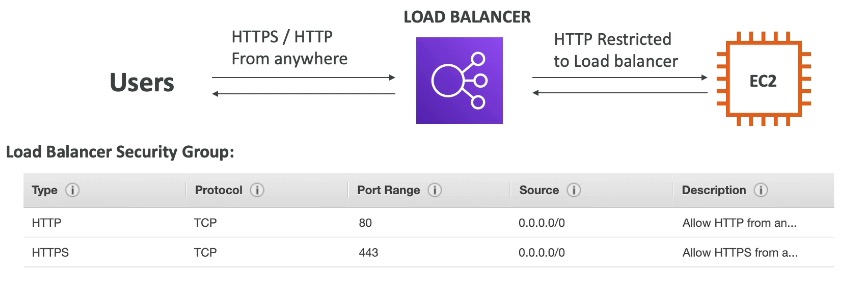
The load balancer’s security group allows inbound traffic from anywhere:
- HTTP: port 80, source:
0.0.0.0/0 - HTTPS: port 443, source:
0.0.0.0/0
0.0.0.0/0 is CIDR notation meaning “any IP address.” A CIDR block expresses an IP range as a base address + prefix length (e.g., 10.0.0.0/16 covers 10.0.0.0 to 10.0.255.255). /0 means no bits are fixed, so all IPs match.
EC2 instances should only accept traffic from the load balancer. Their security group rule sets the source to the load balancer’s security group (not a static IP, since the LB’s IP can change). This means only the load balancer can reach the EC2, even if someone else knows the instance’s private IP.

Application Load Balancer (ALB)
ALB operates at Layer 7 (HTTP). Supports:
- Load balancing across machines (target groups) and across applications on the same machine (containers)
- HTTP/2 and WebSocket
- Redirects (e.g., HTTP to HTTPS)
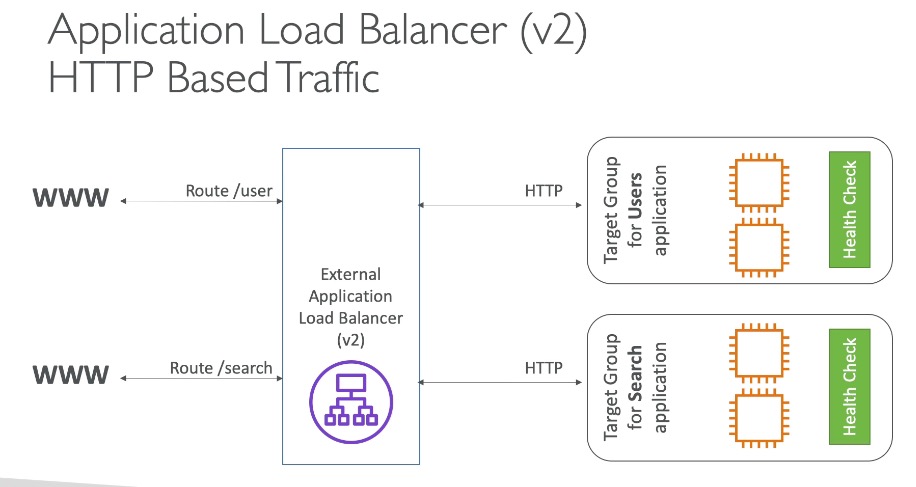
- Content-based routing to different target groups:
- By path:
example.com/usersvsexample.com/posts - By hostname:
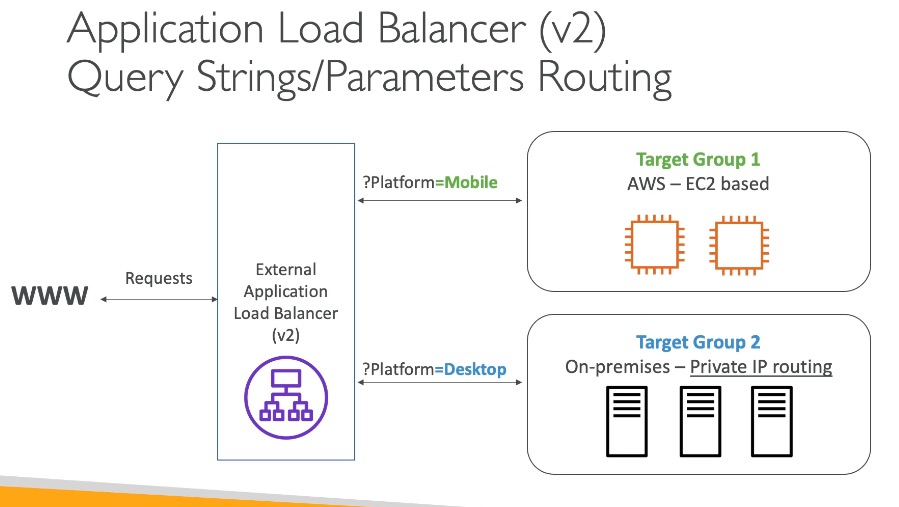
one.example.comvsother.example.com - By query string / headers:
example.com/users?id=123
- By path:
ALB is the go-to for microservices and container-based apps (Docker, ECS). Microservices split an application into small, independently deployable services (auth, payments, search, etc.). The alternative is a monolith - one large application where all functionality runs as a single unit. Monoliths are simpler to start but can’t be scaled or deployed piece by piece.
Target Groups
Target groups are the named destinations that ALB routes traffic to. Can contain:
- EC2 instances (managed by an Auto Scaling Group) - HTTP
- ECS tasks (managed by ECS) - HTTP
- Lambda functions - HTTP request translated to a JSON event
- IP addresses - must be private IPs
ALB can route to multiple target groups. Health checks are performed at the target group level.
Good to know:
- Fixed hostname:
XXX.region.elb.amazonaws.com - Backend instances don’t see the client’s IP directly. The load balancer terminates the client connection and opens a new one to the backend, so backends see the LB’s IP. The client’s real IP is passed in headers:
X-Forwarded-For- client IPX-Forwarded-Port- client portX-Forwarded-Proto- client protocol
X-Forwarded-For
ALB does not pass the client’s real IP to backend instances. If your app needs it, read
X-Forwarded-For- not the connection’s source IP.
Network Load Balancer (NLB)
NLB operates at Layer 4 (Transport) - routes based on IP + port without inspecting HTTP content. Supports:
- TCP, TLS (encrypted TCP), and UDP traffic
- Millions of requests per second with ultra-low latency
NLB has one static IP per AZ and supports assigning an Elastic IP (a static public IPv4 address you own). This matters for whitelisting - if a client’s firewall only allows traffic from specific known IPs, you can point them to the NLB’s fixed IP. ALB uses dynamic IPs behind a DNS name, so you can’t whitelist it by IP.
NLB vs ALB - Static IP
NLB provides a static IP per AZ (useful for IP whitelisting). ALB does not - it uses a hostname with dynamic IPs behind it. Common exam trap.
Target Groups
- EC2 instances
- IP addresses - must be private IPs (manually specified; useful for on-premises servers not managed by AWS)
- Application Load Balancer - put NLB in front of ALB when you need a static IP for whitelisting but also want ALB’s HTTP-based routing
- Health checks support TCP, HTTP, and HTTPS
Gateway Load Balancer (GLB)
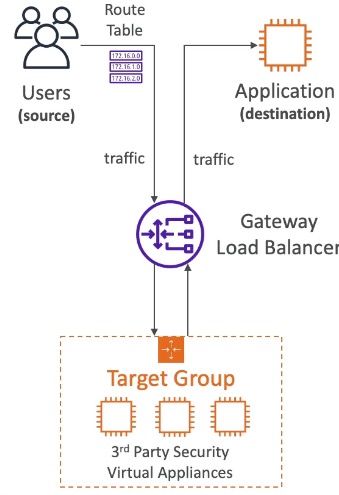
GLB operates at Layer 3 (Network) - IP packets. Used to deploy, scale, and manage a fleet of 3rd-party network virtual appliances such as firewalls, intrusion detection systems, and deep packet inspection tools.
All user traffic is transparently routed through the virtual appliances first - they inspect and filter it - then it continues to your actual application. GLB load-balances across multiple appliance instances so the inspection tier has no single point of failure.
GLB combines:
- Transparent Network Gateway - single entry/exit for all traffic
- Load Balancer - distributes traffic across your virtual appliances
Uses the GENEVE protocol on port 6081.
Target Groups
- EC2 instances
- IP addresses - must be private IPs
Sticky Sessions (Session Affinity)
Sticky sessions ensure the same client always routes to the same backend instance. Works for ALB and NLB.
A cookie is a small piece of data stored in the user’s browser. The browser sends it back on every request to the same site. The load balancer sets a sticky session cookie so it can identify which instance to route a returning client to. The cookie has a configurable expiration date.
Use case: prevent users from losing session data (e.g., shopping cart, login state).
Enabling stickiness can cause load imbalance across backend instances.
Cookie Types
| Type | Cookie Name | Generated by |
|---|---|---|
| Application-based custom cookie | Custom (not AWSALB / AWSALBAPP / AWSALBTG - those are reserved) | Target (your app) |
| Application-based application cookie | AWSALBAPP | Load balancer |
| Duration-based (ALB) | AWSALB | Load balancer |
Cross-Zone Load Balancing
- With cross-zone: each LB node distributes traffic evenly across all registered instances in all AZs.
- Without cross-zone: each LB node only distributes traffic to instances in its own AZ.
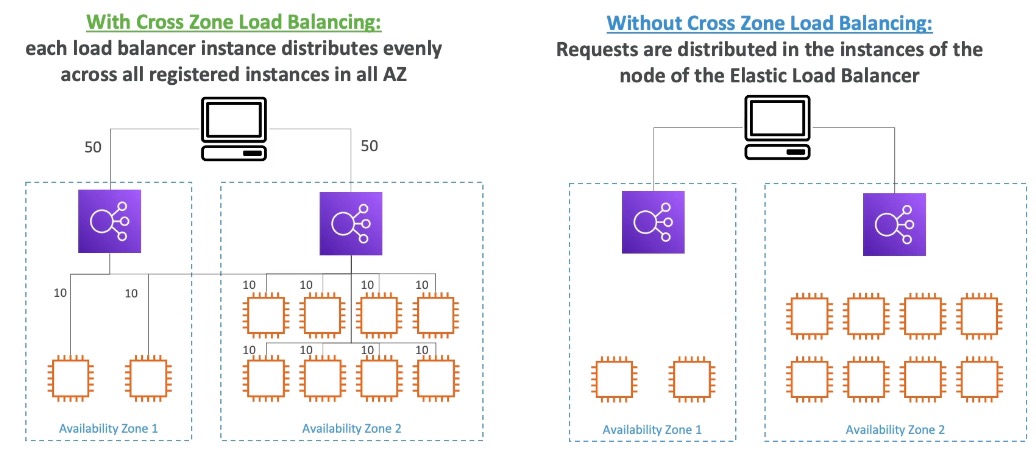
Cross-zone defaults differ by LB type
LB Type Default Inter-AZ charge ALB Enabled (can disable at Target Group level) No charge NLB & GLB Disabled Charged if enabled
SSL/TLS
Basics
SSL (Secure Sockets Layer) was the original protocol for encrypting connections - now deprecated and insecure. TLS (Transport Layer Security) is its newer, more secure successor (TLS 1.2 and 1.3 are current standards). People still say “SSL” colloquially, but what’s actually in use is TLS. AWS uses “SSL/TLS” throughout its docs - treat them as the same thing for exam purposes.
Certificate Authorities (CAs) are trusted third parties (e.g., DigiCert, Comodo, GoDaddy, Let’s Encrypt) that verify you own a domain and sign your certificate. Browsers trust a pre-installed list of CAs - that’s why the padlock appears. SSL certificates have an expiration date and must be renewed.
SSL Certificates on ELB

The load balancer uses an X.509 certificate managed via ACM (AWS Certificate Manager) or uploaded manually.
An HTTPS listener is configured on the load balancer. It:
- Listens for HTTPS on port 443
- Decrypts traffic using the configured certificate (SSL termination)
- Forwards plain HTTP to the backend
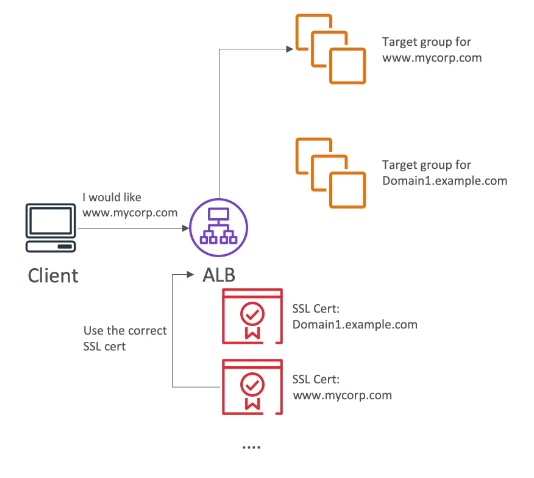
Backend EC2 instances receive unencrypted HTTP - they don’t handle SSL. You must specify a default certificate on the listener; you can add more to support multiple domains. Clients use SNI to indicate which hostname they’re reaching.
Server Name Indication (SNI)
SNI solves the problem of hosting multiple SSL certificates on one load balancer to serve multiple domains. The client includes the target hostname in the initial TLS handshake, and the load balancer returns the matching certificate.
Supported by ALB and NLB (and CloudFront). Allows a single load balancer to serve multiple listeners with multiple SSL certificates.
Deregistration Delay (Connection Draining)
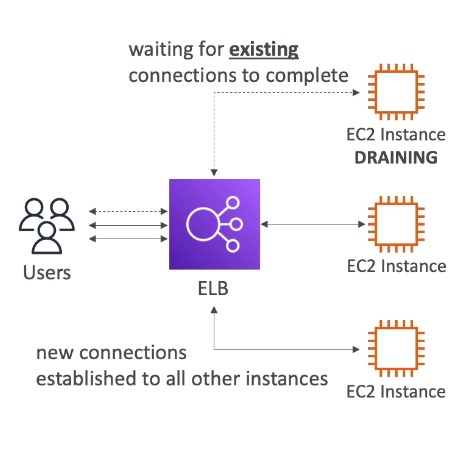
Allows in-flight requests to complete while an instance is being deregistered or is unhealthy:
- The LB immediately stops routing new requests to the draining instance
- Existing requests are given time to finish
- Configurable: 1-3600 seconds (default 300s). Set low for short-lived requests. Set to 0 to disable.
When an instance gracefully deregisters: in-flight requests complete within the draining window before the instance is removed. When an instance crashes: health checks detect failure and new traffic stops routing to it, but in-flight requests will timeout - deregistration delay only helps with graceful shutdowns, not crashes.
Auto Scaling Group (ASG)
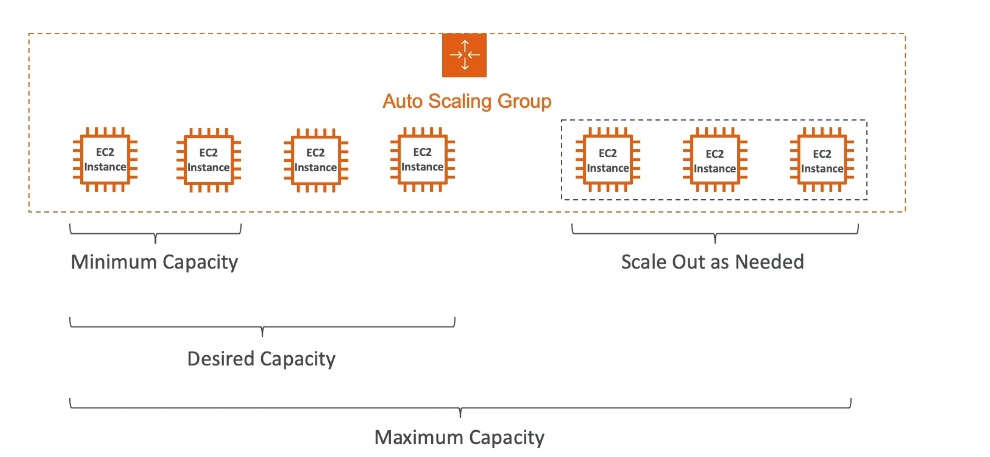
An ASG automatically adds (scales out) or removes (scales in) EC2 instances to match load:
- Enforces minimum and maximum instance counts
- Automatically registers new instances with the load balancer
- Re-creates terminated or unhealthy instances
ASG itself is free - you only pay for the EC2 instances it runs.
You configure three capacity values:
- Minimum - ASG never goes below this
- Desired - ASG aims to maintain this count
- Maximum - ASG never exceeds this
ASG Attributes
ASGs use a Launch Template (Launch Configurations are deprecated) defining how to launch instances:
- AMI + Instance Type
- EC2 User Data
- EBS volumes
- Security groups
- SSH Key Pair
- IAM Roles
- Network + Subnets
- Load balancer info
Scaling Policies
Dynamic Scaling:
- Target Tracking Scaling - simplest. Set a target metric and ASG keeps you near it (e.g., keep average CPU at ~40%).
- Simple / Step Scaling - a CloudWatch alarm at a threshold triggers a specific action (e.g., CPU > 70% -> add 2 units; CPU < 30% -> remove 1 unit).
Scheduled Scaling - anticipate load based on known patterns (e.g., add instances every Friday at 5pm).
Predictive Scaling - ML-based; continuously forecasts load and schedules scaling ahead of time.
CloudWatch monitors metrics, triggers alarms at thresholds, and those alarms fire the scaling policies.
Good metrics to scale on:
- CPU utilization
- Request count per target (keep requests per EC2 stable)
- Average network in/out (for network-bound apps)
- Any custom CloudWatch metric
Scaling Cooldowns
After a scaling activity, ASG enters a cooldown period (default 300 seconds) during which no new instances are launched or terminated. This lets metrics stabilize before the next scaling decision.
Tip: use a pre-baked AMI to minimize instance startup time, which lets you shorten the cooldown.
Instance Refresh
Used to update all instances when you change the Launch Template. Configure:
- Minimum healthy percentage - the % of instances that must stay healthy during the rollout. ASG only terminates old instances once replacements are running and healthy.
- Warm-up time - how long a newly launched instance needs before it’s counted as healthy and ready to serve traffic (e.g., time to load caches, start services). Prevents ASG from removing old instances before replacements are truly ready.
Exam Tips & Gotchas
- ALB = Layer 7 (HTTP routing). NLB = Layer 4 (TCP/UDP, static IP). GLB = Layer 3 (virtual appliances).
- ALB does not forward client IP to backends - use
X-Forwarded-For. - NLB has a static IP per AZ; ALB does not. Use NLB when clients need to whitelist a specific IP.
- Cross-zone load balancing: ALB enabled by default (no inter-AZ charge). NLB/GLB disabled by default (charged if enabled).
- SNI allows one LB to serve multiple SSL certs for multiple domains. Supported by ALB and NLB.
- The term for allowing in-flight requests to complete is Deregistration Delay on ALB/NLB (also called Connection Draining historically).
- ASG is free - you pay for EC2 instances only.
- Launch Configurations are deprecated - use Launch Templates.
Integrations
- EC2 - the classic target behind ALB/NLB; instances register in target groups and receive traffic once healthy.
- ASG (Auto Scaling Group) - automatically registers/deregisters instances with the load balancer as it scales.
- ACM (AWS Certificate Manager) - issues and manages the X.509 certificates used for SSL termination on HTTPS listeners.
- CloudWatch - ELB and ASG metrics (health, request count, CPU) feed alarms that drive scaling policies.
- Route 53 - commonly points an Alias record at the load balancer as the entry point for a domain.
- WAF - can attach to an ALB to filter malicious traffic before it reaches targets.
Review Log
- 2026-07-26 | Good | Gaps: cross-zone defaults (got ALB/NLB reversed), OSI layer names (confused Transport/Network), cooldown default (conflated with deregistration delay range), Target Tracking vs Simple/Step distinction, NLB static IP use case (whitelisting) | Solid: deregistration delay, HA vs scalability with examples, health checks, X-Forwarded-For reasoning, SNI (needed a nudge on certificates but got the concept), scheduled/predictive scaling | Next session: probe cross-zone defaults, layer names, and Target Tracking vs Step Scaling harder
Review Questions
What layer does each load balancer operate at?
A: ALB = Layer 7 (Application - HTTP/HTTPS). NLB = Layer 4 (Transport - TCP/UDP). GLB = Layer 3 (Network - IP).
What's the difference between scalability and high availability?
A: Scalability = system can handle more load by adding resources. HA = system stays up even when something fails. They’re related but distinct - you can have one without the other.
How does ELB detect and handle an unhealthy instance?
A: Health checks ping a port/route (e.g., /health on port 80). A non-200 response marks the instance unhealthy and traffic stops routing to it.
How does a backend EC2 instance get the client's real IP?
A: From the
X-Forwarded-Forheader. The LB terminates the client connection and opens a new one to the backend, so the backend sees the LB’s IP by default.
When would you choose NLB over ALB?
A: When you need: a static IP per AZ (for whitelisting), TCP/UDP routing (non-HTTP), or ultra-high performance with low latency.
What is SNI and which load balancers support it?
A: Server Name Indication - the client includes the target hostname in the TLS handshake, letting one LB serve multiple SSL certificates. Supported by ALB, NLB, and CloudFront.
What is Deregistration Delay and what does it not protect against?
A: Time (default 300s) for in-flight requests to finish when an instance deregisters. The LB stops new requests immediately. It does not help when an instance crashes - in-flight requests to a crashed instance will timeout.
What is the default ASG scaling cooldown and why does it exist?
A: 300 seconds. Prevents ASG from launching/terminating more instances immediately after a scaling event - lets metrics stabilize before the next decision.
What are the three types of dynamic scaling in ASG?
A: Target Tracking (maintain a target metric), Simple/Step Scaling (alarm at threshold triggers add/remove), Scheduled Scaling (anticipate patterns). Predictive scaling is a fourth type using ML forecasting.
What are the cross-zone load balancing defaults for ALB vs NLB/GLB?
A: ALB: enabled by default, no inter-AZ charge. NLB and GLB: disabled by default, charged if enabled.
Vertical vs horizontal scaling - define each and give a typical use.
A: Vertical = bigger instance (more CPU/RAM); common for non-distributed systems like databases; has an upper limit. Horizontal (elasticity) = more instances; implies a distributed system; standard for web apps.
What's the difference between active and passive high availability?
A: Active = all instances serve traffic simultaneously (load-balanced EC2s across AZs). Passive = a standby sits idle and only takes over on primary failure (RDS Multi-AZ standby).
What target types can an ALB route to?
A: EC2 instances (via ASG), ECS tasks, Lambda functions (the HTTP request is translated into a JSON event), and private IP addresses. Health checks are configured at the target group level.
What can an ALB route on, and what redirect can it perform?
A: Path (
/usersvs/posts), hostname (one.example.comvsother.example.com), and query strings / headers. It can also redirect HTTP → HTTPS.
Why would you put an NLB in front of an ALB?
A: To get the NLB’s static IP per AZ (for client-side IP whitelisting) while still using the ALB’s Layer 7 HTTP-based routing behind it. ALB is a valid NLB target type.
What is a Gateway Load Balancer for, and what protocol/port does it use?
A: Deploying and scaling third-party network virtual appliances (firewalls, IDS, deep packet inspection). All traffic is transparently routed through the appliance fleet before reaching the app. Uses the GENEVE protocol on port 6081 at Layer 3.
What are the sticky session cookie types, and which names are reserved?
A: Application-based custom cookie (generated by your app; cannot be named AWSALB / AWSALBAPP / AWSALBTG - those are reserved), application-based application cookie
AWSALBAPP(LB-generated), and duration-basedAWSALB(LB-generated).
What's the downside of enabling sticky sessions?
A: Load imbalance - pinning clients to specific instances means traffic no longer spreads evenly across the backend fleet.
Internal vs external load balancer?
A: Internal (private) is only reachable within your VPC - used for routing between internal services. External (public) has a public DNS name and handles internet-facing traffic.
How should a backend EC2's security group be configured behind a load balancer, and why?
A: Set the inbound source to the load balancer’s security group, not an IP - the LB’s IP can change. This means only the LB can reach the instance, even if someone knows its private IP.
What does an HTTPS listener do, and what do backends receive?
A: It listens on port 443 and decrypts traffic using an X.509 certificate from ACM (SSL termination), then forwards plain HTTP to the backend. Backend instances never handle SSL. A default certificate is required on the listener.
What three capacity values does an ASG configure?
A: Minimum (never goes below), Desired (the count it aims to maintain), Maximum (never exceeds).
What defines how an ASG launches instances, and what's the deprecated version?
A: A Launch Template (AMI, instance type, user data, EBS volumes, security groups, key pair, IAM roles, network/subnets, LB info). Launch Configurations are deprecated - always answer Launch Template.
What two settings control an ASG Instance Refresh?
A: Minimum healthy percentage - the share of instances that must stay healthy, so old instances only terminate once replacements are running. Warm-up time - how long a new instance needs before it counts as healthy and ready to serve.
What are good metrics to scale an ASG on?
A: CPU utilization, request count per target, average network in/out (for network-bound apps), or any custom CloudWatch metric.
What is predictive scaling?
A: ML-based scaling that continuously forecasts future load and schedules capacity changes ahead of time, rather than reacting to a metric threshold.
What does an ASG itself cost?
A: Nothing - ASG is free; you pay only for the EC2 instances it runs.