Route 53
Summary: Route 53 is AWS’s highly available, scalable, fully managed DNS service that translates human-friendly hostnames into IP addresses. It’s also a domain registrar and supports health checks and multiple routing policies to control how traffic is directed to your resources.
DNS Basics
DNS (Domain Name System) translates human-friendly hostnames into machine IP addresses (e.g. www.google.com → 172.217.18.36). It’s the backbone of the internet.
DNS uses a hierarchical naming structure, read right-to-left - each level is a “child” zone delegated by the level above it:
.com                    ← TLD (Top Level Domain)
└── example.com         ← SLD (Second Level Domain)
    ├── www.example.com  ← subdomain (e.g. web server)
    └── api.example.com  ← subdomain (e.g. API Gateway endpoint)
- TLD - managed by a registry (e.g. Verisign for
.com) - SLD - the domain you register under a TLD
- Subdomain - anything you create under your SLD; each can point to a different resource
Breaking down a full URL, http://api.www.example.com:
| Piece | Value | Role |
|---|---|---|
http | protocol | how to connect |
.com | TLD | top level domain |
example.com | SLD | second level domain |
www.example.com | subdomain | one level under the SLD |
api.www.example.com | FQDN | Fully Qualified Domain Name - the full chain from host to TLD |
| everything together | URL | protocol + FQDN |
Terminology:
- Domain registrar - where you register a domain name (Amazon Route 53, GoDaddy, etc.)
- DNS records - A, AAAA, CNAME, NS, …
- Zone file - contains the DNS records for a domain
- Name server - resolves DNS queries (authoritative or non-authoritative)
- TLD -
.com,.us,.in,.gov,.org, … - SLD -
amazon.com,google.com, …
How DNS Resolution Works
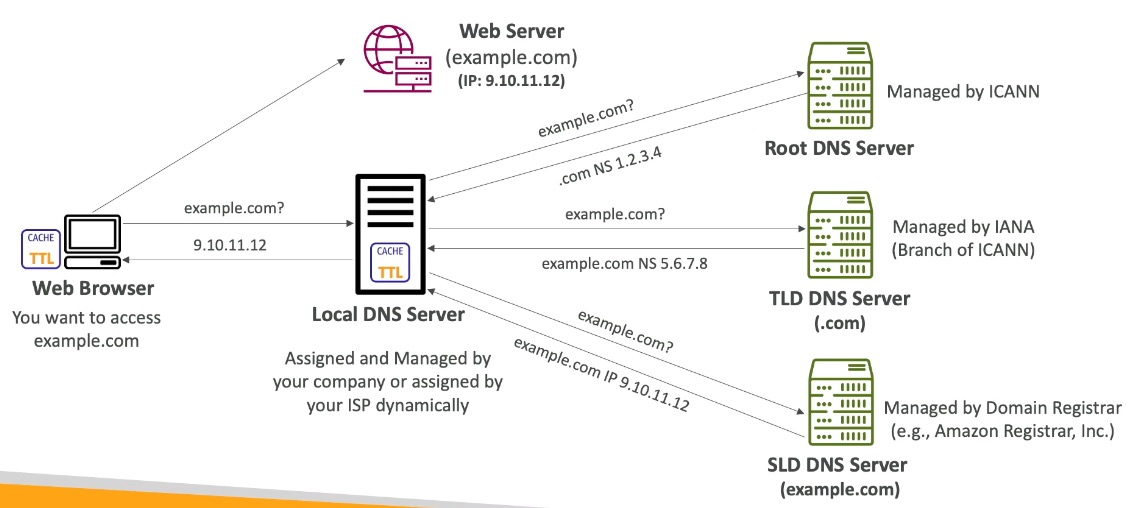
Resolution walks top-down through a chain of servers, with each step returning either the answer or a referral to the next server down:
- Your browser wants to access
example.comand asks the local DNS server (assigned by your ISP or company). - The local DNS server has nothing cached, so it asks a root DNS server (managed by ICANN) “
example.com?” - the root server doesn’t know the answer, but returns the address of the.comTLD server. - The local DNS server asks the TLD server (managed by IANA, a branch of ICANN) - it doesn’t have the final answer either, but returns the address of the SLD server (managed by the domain registrar, e.g. Amazon Registrar) that’s authoritative for
example.com. - The local DNS server asks the SLD server, which returns the actual IP (
9.10.11.12). - The local DNS server caches the result (respecting the TTL) and returns the IP to the browser, which then connects directly to the web server.
Each server in the chain (local, root, TLD, SLD) caches its own TTL so repeat lookups skip steps - this is why lowering a TTL increases query volume and cost.
Key Concepts
- Route 53 is a highly available, scalable, fully managed, and authoritative DNS service
- authoritative = you (the customer) can update the DNS records
- Route 53 is also a domain registrar
- Provides the ability to check the health of your resources
- The only AWS service with a 100% availability SLA
- Name comes from port 53, the traditional DNS port
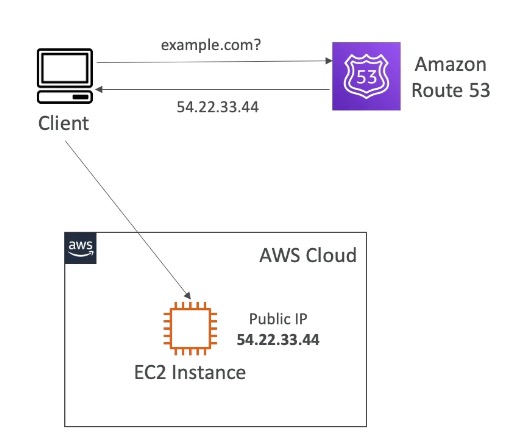
Records
A record defines how traffic is routed for a domain. Each record contains:
- Domain/subdomain name - e.g.
example.com - Record type - e.g. A or AAAA
- Value - e.g.
12.34.56.78 - Routing policy - how Route 53 responds to queries
- TTL - how long the record is cached at DNS resolvers
Route 53 supports the following DNS record types, though only a handful matter for the exam:
| Type | Maps hostname to… | Notes |
|---|---|---|
| A | IPv4 address | e.g. example.com → 12.34.56.78 |
| AAAA | IPv6 address | same idea as A, for IPv6 |
| CNAME | another hostname | target must have an A/AAAA record; can’t be used for the zone apex (e.g. no example.com, but www.example.com is fine) |
| NS | the hosted zone’s name servers | controls how traffic is routed/delegated for a domain |
Advanced types (know they exist, not the details): CAA / DS / MX / NAPTR / PTR / SOA / TXT / SPF / SRV
Hosted Zones
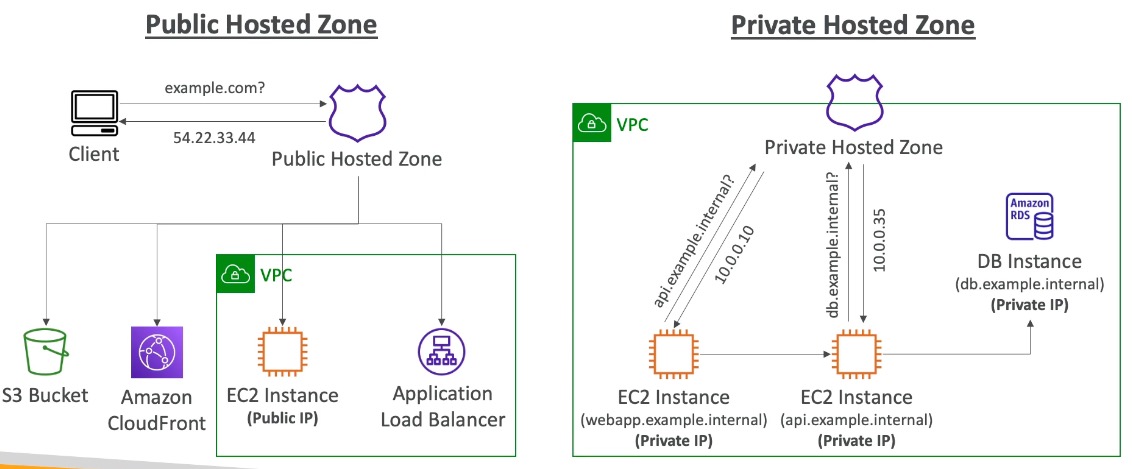
A container for records that define how to route traffic for a domain and its subdomains.
- Public hosted zones - route traffic on the Internet (public domain names), e.g.
application1.mypublicdomain.com - Private hosted zones - route traffic within one or more VPCs (private domain names), e.g.
application1.company.internal - Cost: $0.50/month per hosted zone
Records TTL (Time to Live)
| High TTL (e.g. 24 hr) | Low TTL (e.g. 60 sec) | |
|---|---|---|
| Traffic on Route 53 | Less | More (costs more) |
| Record freshness | Possibly outdated | Outdated for less time |
| Flexibility | Slower to change | Easy to change quickly |
TTL is mandatory for every DNS record except Alias records.
CNAME vs Alias Records
AWS resources (load balancers, CloudFront, etc.) expose an AWS-generated hostname, which is why Alias records exist.
| CNAME | Alias | |
|---|---|---|
| Points to | Any hostname | An AWS resource |
| Zone apex (root domain) | Not allowed | Allowed |
| Cost | N/A | Free |
| Health check | N/A | Native health check |
| TTL | Set manually | Can’t be set (managed automatically) |
- Alias records are always type A/AAAA for AWS resources (IPv4/IPv6)
- They automatically recognize changes in the resource’s IP addresses
Zone apex + AWS resource is the classic exam trap: you cannot use a CNAME for a root domain (e.g.
example.com) pointing at an ELB - you must use an Alias record instead.
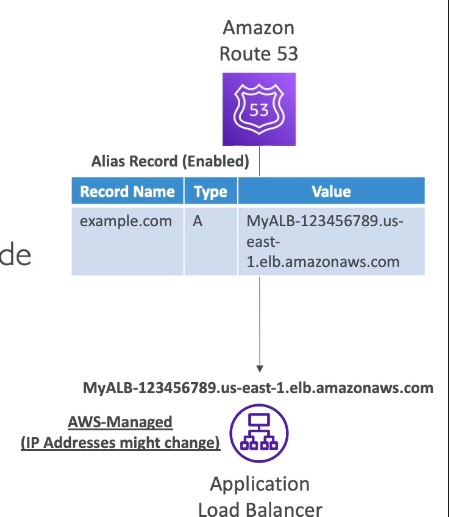
Alias record targets:
- Elastic Load Balancers
- CloudFront distributions
- API Gateway
- Elastic Beanstalk environments
- S3 websites
- VPC Interface endpoints
- Global Accelerator accelerator
- Another Route 53 record in the same hosted zone
You cannot set an Alias record directly for an EC2 DNS name.
Routing Policies
Define how Route 53 responds to DNS queries. Route 53 supports:
- Simple
- Weighted
- Failover
- Latency-based
- Geolocation
- Multi-value answer
- Geoproximity (via Route 53 Traffic Flow)
Routing policies vs. load balancers
Route 53 never touches traffic - it only answers “what IP/hostname should I use?” when a client does a lookup; once the client has that answer, Route 53 is out of the picture and the client connects directly. A load balancer sits in the traffic path and makes a live, per-request decision. Routing policies decide which answer to hand out per DNS lookup (cached for the TTL), not per request.
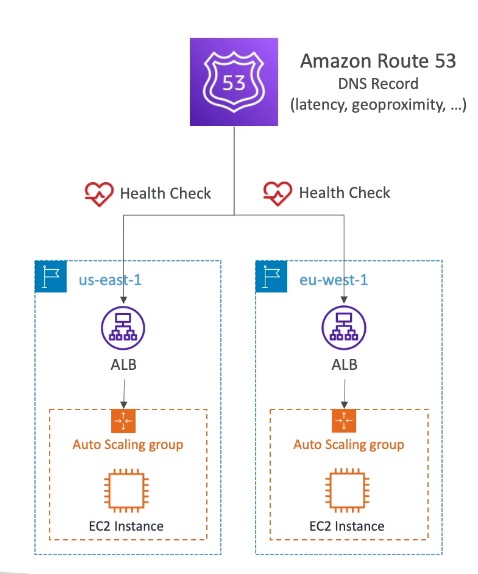
Why need both: routing policies work across regions, accounts, and even non-ELB resources (e.g. routing between two ELBs in different regions, or between an S3 bucket and an EC2 instance) - things a single ELB can’t do since it only balances across targets within its own scope. ELB balances within a region; Route 53 balances/fails over across regions or resource types.
Simple
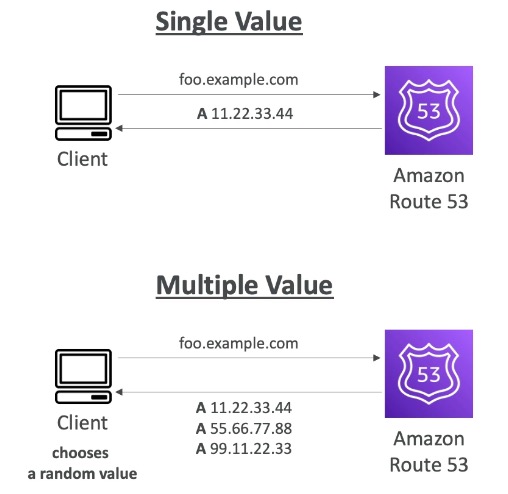
- Typically routes traffic to a single resource
- Can specify multiple values in the same record - if so, the client picks one at random
- When Alias is enabled, specify only one AWS resource
- Cannot be associated with health checks
Weighted
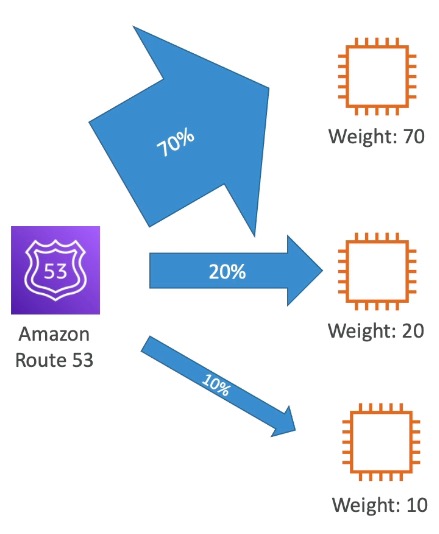
- Controls the % of requests sent to each resource
- Assign each record a relative weight:
\text{traffic \%} = \frac{\text{weight of record}}{\text{sum of all weights}} - Weights don’t need to sum to 100
- DNS records must have the same name and type
- Can be associated with health checks
- Use cases: load balancing between regions, testing new app versions
- Assign a weight of 0 to stop sending traffic to a resource - if all records have weight 0, all are returned equally
Latency-based
- Redirects to the resource with the lowest latency to the user
- Latency is based on traffic between users and AWS Regions (not physical distance) - e.g. German users may be directed to the US if that’s the lowest-latency region
- Can be associated with health checks (adds failover capability)
Failover (active-passive)
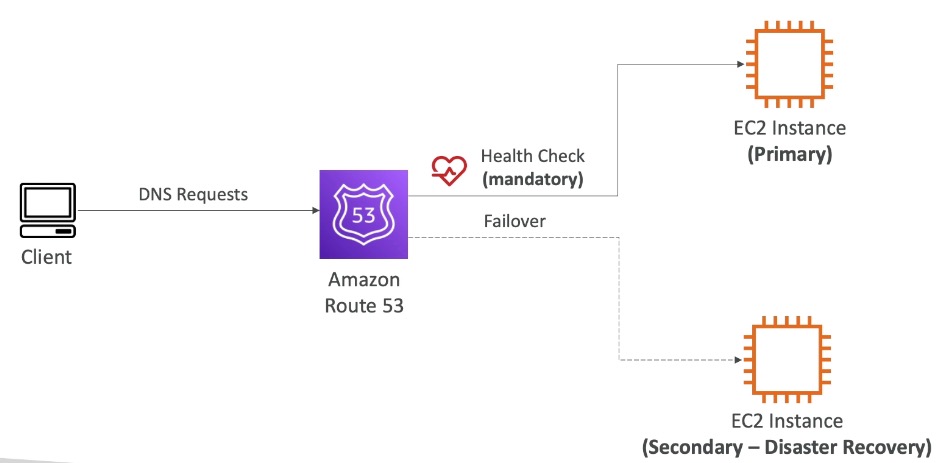
- Mandatory health check; if it fails, traffic routes to the backup instance
- Can be associated with health checks
Geolocation
- Different from latency-based: based on user location, not network latency
- Specify by continent, country, or US state (most precise location wins on overlap)
- Should create a “Default” record for unmatched locations
- Use cases: website localization, content restriction, load balancing
- Can be associated with health checks
Geoproximity
- Routes traffic based on the geographic location of users and resources
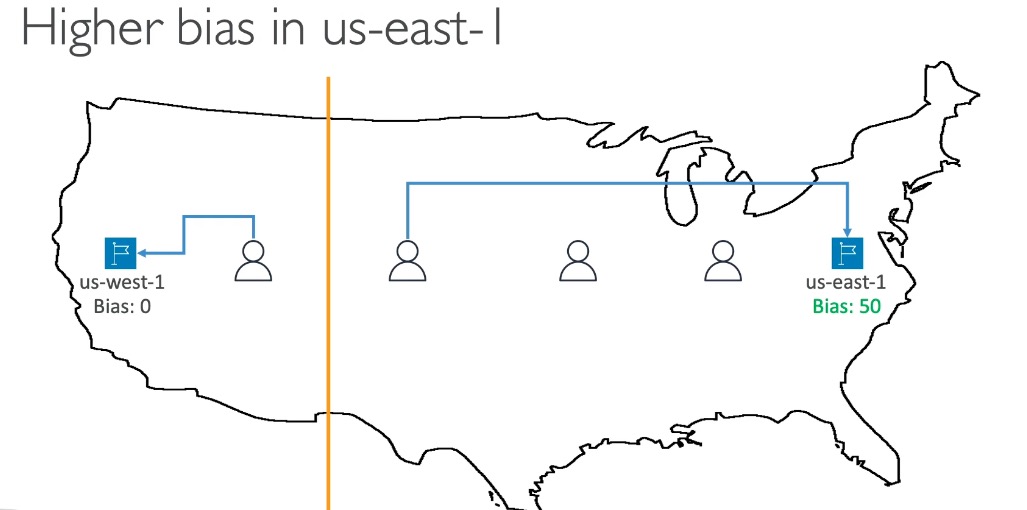
- Shift more/less traffic using bias values:
- Expand (1 to 99) → more traffic to the resource
- Shrink (-1 to -99) → less traffic to the resource
- Resources can be AWS (specify region) or non-AWS (specify latitude/longitude)
- Requires Route 53 Traffic Flow (advanced feature)
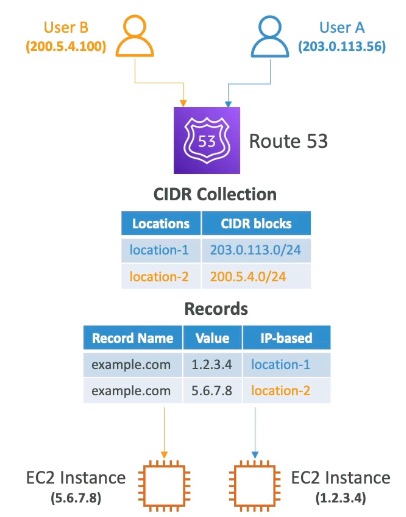
IP-based routing
- Routes based on clients’ IP addresses
- You provide a list of CIDRs for your clients mapped to endpoints/locations
- Use cases: optimize performance, reduce network costs (e.g. route users from a particular ISP to a specific endpoint)
What's a CIDR? CIDR (Classless Inter-Domain Routing) notation expresses an IP range as a base address + prefix length, e.g.
192.168.1.0/24. The/24is how many leading bits are fixed for the network portion, leaving the rest for host addresses.
Multi-Value Answer
- Use when routing traffic to multiple resources
- Route 53 returns multiple values/resources
- Can be associated with health checks (returns only healthy resources)
- Up to 8 healthy records returned per query
Multi-Value answer is not a substitute for having an ELB - it does simple client-side random selection, not real load balancing.
Health Checks
- HTTP health checks are only for public resources
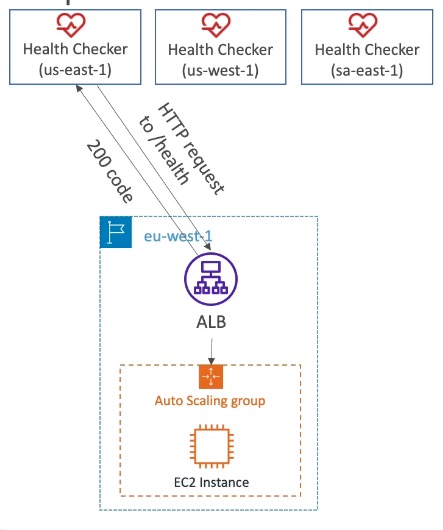
1. Health checks that monitor an endpoint (application, server, other AWS resource)
- ~15 global health checkers check the endpoint
- Healthy/unhealthy threshold: 3 (default)
- Interval: 30 sec (can lower to 10 sec for higher cost)
- Supported protocols: HTTP, HTTPS, TCP
- If >18% of health checkers report healthy, Route 53 considers the endpoint healthy; otherwise unhealthy
- You can choose which locations Route 53 uses for checks
- Passes only when the endpoint responds with 2xx or 3xx status codes
- Can pass/fail based on text found in the first 5120 bytes of the response
- Configure your router/firewall to allow incoming requests from Route 53 health checkers
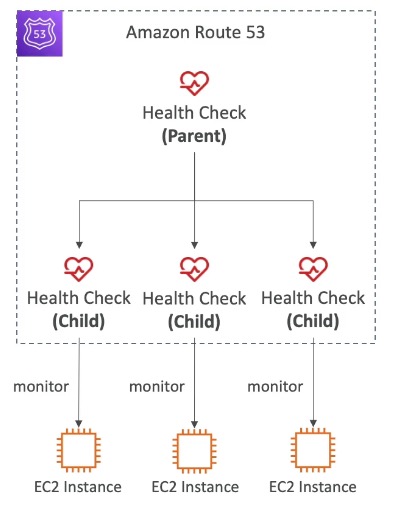
2. Calculated health checks (monitor other health checks)
- Combine results of multiple health checks into one, using OR / AND / NOT
- Can monitor up to 256 child health checks
- Specify how many child checks must pass for the parent to pass
- Use case: perform maintenance without causing all health checks to fail
3. CloudWatch alarm health checks (full control - helpful for private resources)
- Route 53 health checkers sit outside the VPC and can’t reach private endpoints directly
- Workaround: create a CloudWatch metric + alarm, then a health check that monitors the alarm itself (e.g. DynamoDB throttles, RDS alarms, custom metrics)
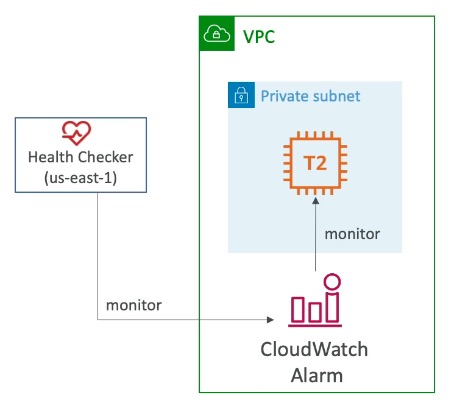
Health checks integrate with CloudWatch metrics.
Domain Registrar vs DNS Service
- You buy/register a domain name with a domain registrar (Amazon Registrar, GoDaddy, etc.), typically paying annual charges
- The registrar usually also provides a DNS service to manage your records - but you can use a different DNS service instead
- Example: purchase a domain from GoDaddy, use Route 53 to manage its DNS records
- To use a 3rd-party registrar with Route 53:
- Create a Hosted Zone in Route 53
- Update the NS records on the 3rd-party registrar’s site to point to the Route 53 name servers
Domain Registrar != DNS service - they're commonly bundled but are separate concerns, and the exam likes to test this distinction.
Configuration & Limits
- Hosted zone: $0.50/month
- Calculated health checks: up to 256 child health checks
- Multi-Value Answer: up to 8 healthy records returned per query
- Health check interval: 30 sec default, 10 sec (higher cost)
- Health check healthy threshold: 3 (default)
- Healthy consensus: >18% of global health checkers must report healthy
Exam Tips & Gotchas
- Alias vs. CNAME for zone apex is one of the most frequently tested traps - remember Alias is required for root domains pointing to AWS resources
- TTL is mandatory for all records except Alias records
- Multi-Value Answer routing is not a substitute for an ELB
- Alias records cannot target an EC2 DNS name directly
- Geolocation is based on user location; Latency-based is based on network latency between user and AWS Region - don’t mix these up
Integrations
- ELB - common Alias record target; Route 53 can route/fail over across multiple ELBs in different regions
- CloudFront - common Alias record target for CDN distributions
- EC2 - cannot be an Alias target directly (use an ELB in front instead)
- CloudWatch - health checks can monitor CloudWatch alarms for private resources; health checks report metrics to CloudWatch
Review Questions
What's the difference between a CNAME record and an Alias record?
A: A CNAME can point to any hostname but cannot be used for the zone apex (root domain). An Alias record points to an AWS resource, works for both root and non-root domains, is free, has native health checks, and can’t have its TTL set manually.
Why can't you create a CNAME record for
example.com(root domain) pointing to a load balancer?A: CNAME records cannot be created for the zone apex (top node of a DNS namespace). You must use an Alias record instead, which supports the zone apex and works for AWS resources.
What's the difference between a public and private hosted zone?
A: Public hosted zones route traffic on the Internet for public domain names; private hosted zones route traffic within one or more VPCs for private domain names.
Is TTL required for every Route 53 record type?
A: No - TTL is mandatory for every DNS record except Alias records, which manage this automatically.
What's the difference between Latency-based and Geolocation routing policies?
A: Latency-based routes to the resource with the lowest network latency between the user and AWS Regions. Geolocation routes based on the user’s actual physical location (continent/country/state), regardless of latency - useful for localization or content restriction.
Why do we need Route 53 routing policies if load balancers already balance traffic?
A: Route 53 never touches traffic - it only decides which answer to give a DNS query, and that decision is cached for the TTL. A load balancer sits in the traffic path and makes a live per-request decision, but only balances across targets within its own scope. Routing policies let you balance/fail over across regions, accounts, or non-ELB resource types that no single ELB can span.
How many health checkers are used per Route 53 health check, and what's the healthy threshold?
A: About 15 global health checkers evaluate the endpoint; if more than 18% report it healthy, Route 53 considers the endpoint healthy (default healthy/unhealthy threshold of 3 consecutive checks).
How can Route 53 health-check a private resource inside a VPC?
A: Route 53 health checkers live outside the VPC and can’t reach private endpoints directly. Instead, create a CloudWatch metric and alarm for the resource, then create a health check that monitors that CloudWatch alarm.
What is CIDR notation and how is it used in Route 53's IP-based routing policy?
A: CIDR (Classless Inter-Domain Routing) expresses an IP range as a base address plus prefix length, e.g.
192.168.1.0/24. IP-based routing uses CIDR blocks to map client IP ranges to specific endpoints.
Walk through the DNS resolution chain for
example.com.A: Browser asks the local DNS server (ISP/company) → local asks a root server (ICANN), which returns the
.comTLD server → local asks the TLD server (IANA), which returns the SLD server authoritative forexample.com→ local asks the SLD server, gets the IP, caches it per TTL, and returns it to the browser, which connects directly.
What's the tradeoff between a high TTL and a low TTL?
A: High TTL (e.g. 24h) = less query traffic and lower cost, but records can be outdated and are slow to change. Low TTL (e.g. 60s) = more queries and higher cost, but records stay fresh and are easy to change quickly.
What do the A, AAAA, CNAME, and NS record types do?
A: A → maps hostname to an IPv4 address. AAAA → maps to an IPv6 address. CNAME → maps to another hostname (target must have an A/AAAA record; not allowed at the zone apex). NS → the hosted zone’s name servers, controlling delegation.
What AWS resources can an Alias record target, and which one can't it?
A: ELB, CloudFront distributions, API Gateway, Elastic Beanstalk environments, S3 websites, VPC Interface endpoints, Global Accelerator, and another Route 53 record in the same hosted zone. It cannot target an EC2 DNS name directly.
How is traffic split in a Weighted routing policy, and what happens if every weight is 0?
A: Each record’s share = its weight ÷ the sum of all weights (weights don’t need to total 100). Records must share the same name and type. A weight of 0 stops traffic to that record - but if all records are 0, all are returned equally.
What's required for a Failover routing policy?
A: A mandatory health check on the primary. When it fails, Route 53 routes to the secondary (backup) record. It’s an active-passive pattern.
How does Geoproximity routing shift traffic, and what does it require?
A: With bias values - expand (1 to 99) sends more traffic to a resource, shrink (-1 to -99) sends less. Resources can be AWS (specify region) or non-AWS (specify latitude/longitude). Requires Route 53 Traffic Flow.
What is IP-based routing used for?
A: You supply CIDR blocks mapping client IP ranges to endpoints - useful for optimizing performance or reducing network costs (e.g. routing a specific ISP’s users to a particular endpoint).
How many records does Multi-Value Answer return, and why isn't it a load balancer?
A: Up to 8 healthy records per query, and it can be associated with health checks so only healthy ones are returned. It’s client-side random selection, not real load balancing - it has no traffic path and makes no per-request decision.
Which routing policy cannot be associated with health checks?
A: Simple. All the others (Weighted, Failover, Latency-based, Geolocation, Geoproximity, Multi-Value) support health checks.
What must a Geolocation policy always include, and how are overlaps resolved?
A: A “Default” record for locations that don’t match any rule. On overlap, the most precise location wins (US state beats country beats continent).
What are calculated health checks and what are their limits?
A: A parent health check that combines the results of other health checks using OR / AND / NOT, with up to 256 child health checks. You specify how many children must pass. Use case: perform maintenance on one component without failing everything.
What makes a Route 53 endpoint health check pass?
A: The endpoint must respond with a 2xx or 3xx status code. It can additionally pass/fail on text found in the first 5120 bytes of the response. You must allow the Route 53 health checker IPs through your firewall.
How do you use a third-party registrar (e.g. GoDaddy) with Route 53 as your DNS?
A: Create a Hosted Zone in Route 53, then update the NS records at the third-party registrar to point at the Route 53 name servers. Registrar and DNS service are separate concerns.
What's unique about Route 53's SLA, and where does the name come from?
A: It’s the only AWS service with a 100% availability SLA. The name comes from port 53, the traditional DNS port.
What does a hosted zone cost?
A: $0.50 per month per hosted zone.