RDS + Aurora + ElastiCache
Summary: RDS is AWS’s managed relational database service; Aurora is AWS’s own high-performance, cloud-native database engine compatible with MySQL and Postgres. ElastiCache adds a managed in-memory caching layer (Redis or Memcached) to offload read pressure from your databases.
RDS (Relational Database Service)
RDS is a managed service for SQL-based relational databases. Supported engines: Postgres, MySQL, MariaDB, Oracle, MSSQL, and Aurora.
Advantages over self-managed DB on EC2
- Automated provisioning and OS patching
- Continuous backups with point-in-time restore
- Monitoring dashboards
- Read replicas for read scaling
- Multi-AZ setup for disaster recovery
- Maintenance windows for upgrades
- Vertical and horizontal scaling
- Storage backed by EBS
- No SSH access - RDS runs on EC2 instances under the hood, but AWS owns the OS layer entirely, so you only interact with the database engine via its connection endpoint
Storage Auto Scaling
Storage Auto Scaling automatically increases your RDS instance’s storage when it’s running low, with no manual intervention.
- Set a Maximum Storage Threshold to cap how far it can scale
- Triggers automatically when all three conditions are met:
- Free storage drops below 10% of allocated storage
- Low-storage state persists for at least 5 continuous minutes (debounce - avoids scaling on a transient spike)
- 6 hours have passed since the last storage modification
- Useful for applications with unpredictable workloads
Read Replicas
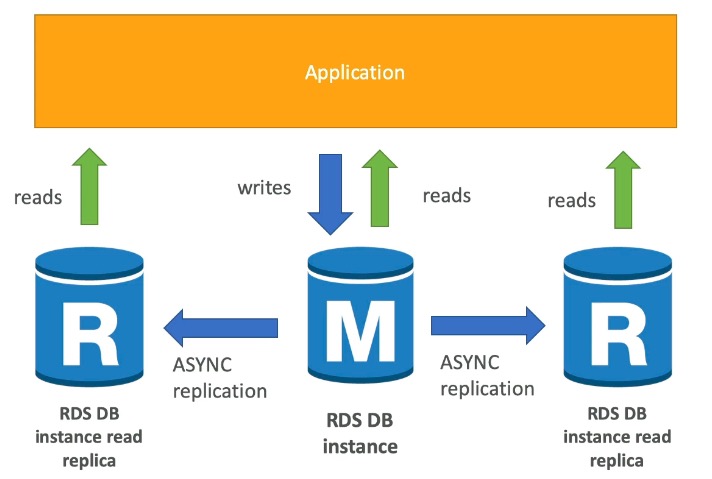
Read Replicas are async, read-only copies of your primary RDS instance used to scale read-heavy workloads.
- Up to 15 read replicas
- Can be within the same AZ, cross-AZ, or cross-region
- Replication is async - reads are eventually consistent
- Replicas can be promoted to become standalone databases
- Applications must update their connection string to use replicas
Use case: Run reporting or analytics on a read replica so the production database is unaffected. Read replicas handle SELECT only - no INSERT, UPDATE, or DELETE. This is the classic OLAP (analytical workload) vs OLTP (transactional workload) split.
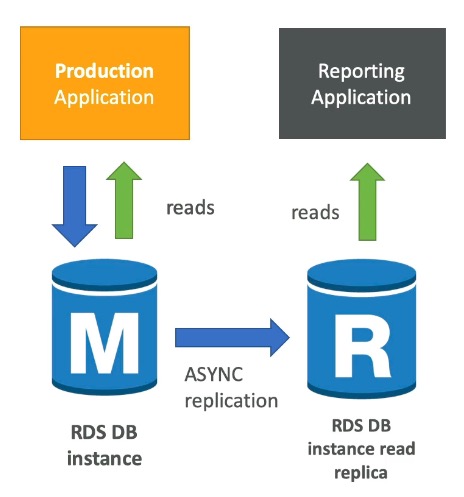
Network cost: Cross-AZ data transfer has a cost in AWS, but read replicas within the same region are exempt from that fee.
Multi-AZ (Disaster Recovery)
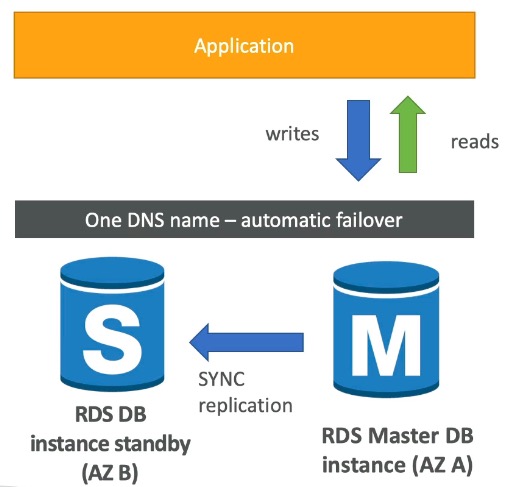
- Sync replication to a standby instance in a different AZ
- One DNS name - automatic failover to standby on failure
- Covers: AZ loss, network loss, instance failure, storage failure
- No manual intervention or app code changes needed
- Not used for scaling - the standby is passive until failover
Read Replicas vs. Multi-AZ
Read Replicas = async replication, for read scaling. Multi-AZ = sync replication, for disaster recovery only. The standby in Multi-AZ does not serve traffic under normal conditions.
Read Replicas can also be set up as Multi-AZ for combined read scaling + DR.
Single-AZ to Multi-AZ Migration
- Zero downtime - no need to stop the DB, just click “Modify”
- Internally: snapshot taken → new DB restored from snapshot in new AZ → synchronization established
RDS Security
- At-rest encryption via AWS KMS (Key Management Service - stores and manages the encryption keys used to encrypt the underlying EBS volume)
- Must be enabled at launch time
- If the master is unencrypted, read replicas cannot be encrypted
- To encrypt an unencrypted DB: take a snapshot → restore as encrypted
- In-flight encryption: TLS-ready by default; use AWS TLS root certificates client-side
- IAM Authentication: connect using IAM roles instead of username/password
- Security Groups: control network access to the DB
- No SSH access, except on RDS Custom
- Audit Logs can be sent to CloudWatch Logs for extended retention
RDS Proxy
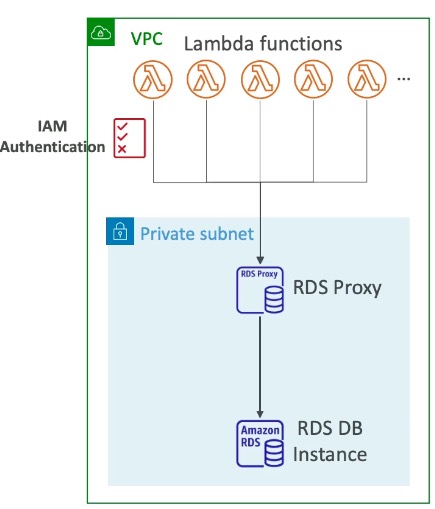
RDS Proxy is a fully managed connection pooler that sits between your application and RDS/Aurora.
- Pools and shares DB connections, reducing CPU/RAM stress and open connection count
- Serverless, auto-scaling, Multi-AZ
- Reduces failover time for RDS and Aurora by up to 66%
- No code changes required for most apps - just point your connection string at the proxy
- Enforces IAM authentication; stores credentials in AWS Secrets Manager
- Never publicly accessible - must be accessed from within a VPC
Amazon Aurora
Aurora is AWS’s proprietary, cloud-optimized relational database engine compatible with MySQL and Postgres.
- Claims 5x performance improvement over MySQL on RDS
- Storage automatically grows in 10 GB increments, up to 128 TB
- Up to 15 replicas with sub-10 ms replica lag (faster than standard RDS replication)
- Instantaneous failover - High Availability native
- Costs ~20% more than standard RDS, but more efficient
High Availability and Read Scaling
- 6 copies of data across 3 AZs:
- 4 out of 6 copies needed for writes
- 3 out of 6 copies needed for reads
- Self-healing via peer-to-peer replication
- Storage striped across hundreds of volumes
- One Aurora instance is the master (handles all writes)
- Automated master failover in under 30 seconds
- Master + up to 15 Aurora Read Replicas serve reads
- Supports Cross Region Replication
Aurora DB Cluster
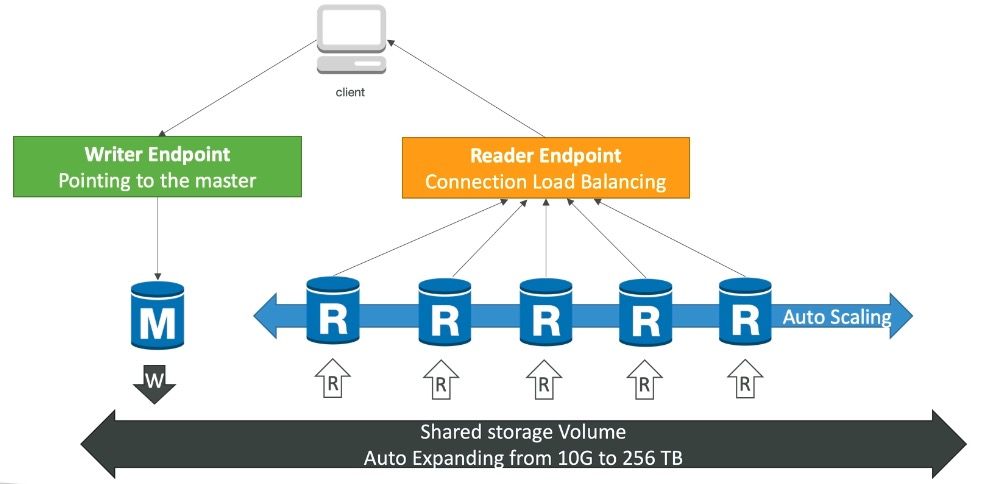
Aurora exposes two endpoints:
- Writer Endpoint - always points to the master
- Reader Endpoint - load-balances reads across all read replicas
Backed by a shared storage volume that all instances access.
Aurora Features
- Automatic failover
- Backup and recovery
- Isolation and security
- Industry compliance
- Push-button scaling
- Automated patching with zero downtime
- Advanced monitoring
- Routine maintenance
- Backtrack - restore data to any point in time without using traditional backups
Amazon ElastiCache
ElastiCache is AWS’s fully managed in-memory caching service - a separate AWS service, not a feature of RDS. It is to Redis/Memcached what RDS is to relational databases: you get a managed cache without running Redis or Memcached on EC2 yourself.
- In-memory databases: very high performance, very low latency
- Offloads read pressure from relational databases for read-intensive workloads
- Helps make applications stateless (store session data in the cache rather than on the app instance)
- AWS manages OS patching, setup, configuration, monitoring, failure recovery, and backups
- Requires application code changes to integrate
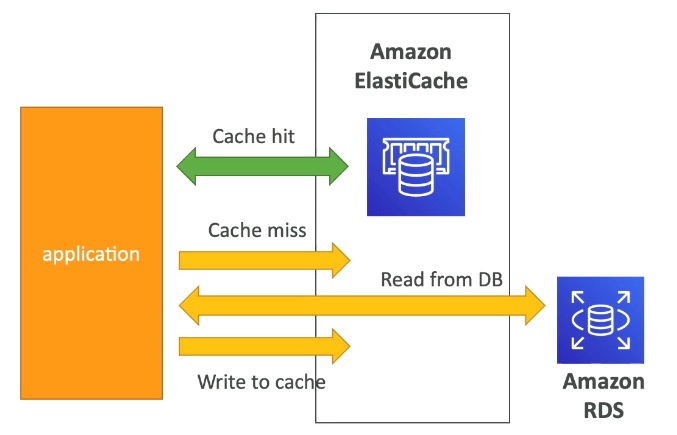
Use Case: DB Cache
Application checks ElastiCache first; on a cache miss, fetches from RDS and stores the result in ElastiCache for future requests.
- Relieves read load on RDS
- Cache must have an invalidation strategy to prevent stale data from accumulating
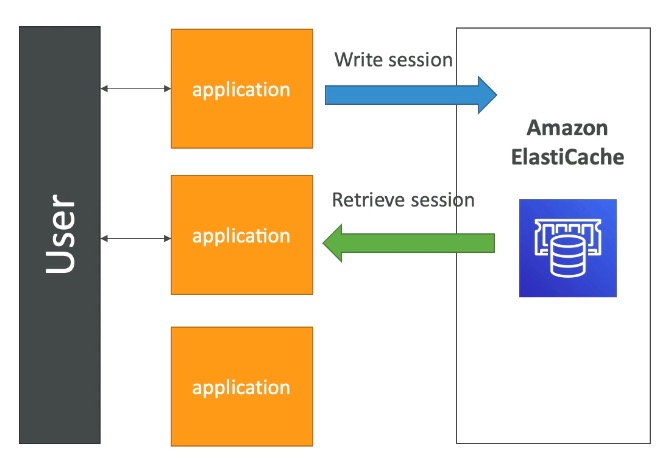
Use Case: User Session Store
- User logs in on any application instance
- App writes session data to ElastiCache
- User hits a different app instance
- That instance retrieves the session from ElastiCache - user is already logged in
Redis vs. Memcached
| Feature | Redis | Memcached |
|---|---|---|
| Multi-AZ with auto-failover | Yes | No |
| Read replicas / HA | Yes | No |
| Data persistence (AOF) | Yes | No |
| Backup and restore | Yes | Yes (serverless) |
| Complex data types (sets, sorted sets) | Yes | No |
| Multi-threaded | No | Yes |
| Horizontal sharding | No | Yes |
AOF (Append Only File): Redis’s persistence mechanism. Every write command is logged sequentially to a file. On restart, Redis replays the log to rebuild the dataset, surviving crashes without losing data.
Memcached is a simpler, older caching system - pure key-value with no durability, no replication, and no complex data types. Its advantage is a multi-threaded architecture that can be faster for pure caching at high concurrency. If you’ve used Redis, Memcached is the stripped-down version with none of the extras.
Redis vs. Memcached on the exam
Choose Redis when you need persistence, replication, high availability, or complex data types. Choose Memcached for pure ephemeral caching with simple key-value access.
Caching Design Patterns
Before caching, consider:
- Safe? Data can tolerate being slightly stale
- Effective? Data changes slowly; a small set of keys are frequently accessed
- Anti-pattern: Data changes rapidly, or the full key space is accessed uniformly
1. Lazy Loading (Cache-Aside / Lazy Population)
Fetch from cache first. On a miss, load from DB and populate the cache.
Pros:
- Only requested data is cached
- Node failures aren’t fatal - just increased latency while cache warms up
Cons:
- Cache miss = 3 round trips (check cache → hit DB → write to cache) - noticeable delay
- Stale data: DB can be updated while the cache still holds the old value
The exam includes pseudocode for this pattern:
def get_user(user_id):
    record = cache.get(user_id)
    if record is None:
        record = db.query("SELECT * FROM users WHERE id = ?", user_id)
        cache.set(user_id, record)
        return record
    else:
        return record
2. Write-Through
Update the cache every time the DB is written to.
Pros:
- Cache is never stale
- Reads are always fast - data is pre-warmed
Cons:
- Write penalty: each DB write requires 2 operations (write DB + write cache)
- Cache churn: data gets cached even if it’s never read
- Missing data: keys that have never been written won’t exist in the cache yet. Mitigation: layer lazy loading on top - on a cache miss, fall back to the DB and populate the cache. Write-through keeps existing data fresh; lazy loading fills in keys that haven’t been explicitly written yet.
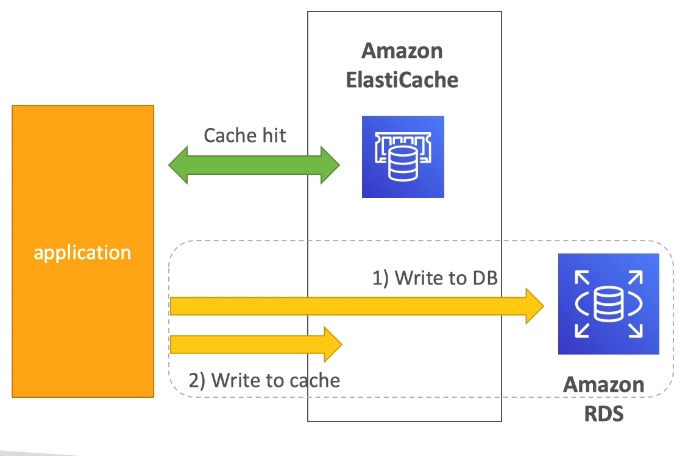
def save_user(user_id, values):
    record = db.query("UPDATE users ... WHERE id = ?", user_id, values)
    cache.set(user_id, record)
    return record
3. Cache Evictions and TTL
Cache eviction occurs when:
- You explicitly delete the item
- Memory is full and the item was least recently used (LRU eviction)
- The item’s TTL (Time-to-Live) expires
TTL is useful for any time-sensitive data: leaderboards, comments, activity feeds. Range from seconds to days depending on stale-data tolerance. If evictions are happening too frequently due to memory pressure, scale up (larger node) or scale out (more nodes).
Best practices:
- Lazy loading is a good foundation for read-side caching
- Combine write-through with lazy loading for full coverage
- Always set a sensible TTL, except when using write-through (data is kept fresh on writes)
- Only cache data that makes sense to cache
Amazon MemoryDB for Redis
MemoryDB is a Redis-compatible, fully durable in-memory database service - as opposed to ElastiCache, which is primarily a cache layer.
| ElastiCache for Redis | MemoryDB for Redis | |
|---|---|---|
| Primary role | Cache in front of DB | Primary database |
| Durability | Optional | Full (Multi-AZ transactional log) |
| Data loss on failure | Possible | No |
- Up to 160 million requests/second
- Scales from 10s of GB to 100s of TB
- Use cases: web/mobile apps, online gaming, media streaming
MemoryDB vs. ElastiCache
ElastiCache is the cache layer in front of your database. MemoryDB is the database itself - fully durable, Redis-compatible, and designed to be your primary store.
Exam Tips & Gotchas
Read Replicas vs. Multi-AZ (frequently confused)
Read Replicas = async, read-scaling, separate connection string, promotable to standalone. Multi-AZ = sync, disaster recovery only, standby never serves reads under normal conditions.
Redis vs. Memcached
Choose Redis for persistence, replication/HA, or complex data types. Choose Memcached for pure ephemeral caching with multi-threaded throughput and horizontal sharding.
- RDS encryption must be enabled at launch time; an unencrypted master can never have encrypted read replicas - snapshot and restore as encrypted instead.
- No SSH access to RDS (except RDS Custom) - AWS owns the OS layer.
- Aurora write/read quorum: 4 of 6 copies for writes, 3 of 6 for reads, across 3 AZs.
- ElastiCache is a separate service, not an RDS feature - it requires application code changes to integrate (unlike Read Replicas, which just need a connection string change).
- MemoryDB is a durable primary database; ElastiCache is a cache layer that can lose data on failure - don’t conflate the two.
Integrations
- EC2 - RDS runs on EC2 under the hood (no direct access); ElastiCache clients and app servers typically run on EC2.
- AWS KMS - encrypts RDS/Aurora storage at rest.
- AWS Secrets Manager - stores the credentials RDS Proxy uses for IAM-authenticated connections.
- CloudWatch - RDS audit logs and Aurora/ElastiCache metrics ship here for monitoring and alarms.
- VPC - RDS, Aurora, and ElastiCache all live in private/data subnets, reachable via security groups.
Review Questions
What are the three conditions that must all be met before RDS Storage Auto Scaling triggers?
A: Free storage < 10% of allocated, the low-storage state has lasted at least 5 continuous minutes, and 6 hours have passed since the last storage modification.
What is the replication type for RDS Read Replicas vs. RDS Multi-AZ?
A: Read Replicas use async replication (eventually consistent). Multi-AZ uses sync replication.
Can you read from the Multi-AZ standby instance under normal conditions?
A: No. The standby is passive and only becomes active during a failover. It does not serve read traffic.
How do you convert an unencrypted RDS database to an encrypted one?
A: Take a DB snapshot, then restore it as an encrypted instance. You cannot enable encryption on a running unencrypted DB in place.
What is the main purpose of RDS Proxy?
A: Connection pooling - reduces open connections to the DB, lowers CPU/RAM stress, and speeds up failover by up to 66%. It also enforces IAM auth and is only accessible from within a VPC.
What do Aurora's writer endpoint and reader endpoint do?
A: The writer endpoint always points to the master. The reader endpoint load-balances reads across all read replicas.
What are the three caching design patterns covered in ElastiCache?
A: Lazy loading (cache-aside), write-through, and TTL/cache eviction.
What is the difference between ElastiCache for Redis and MemoryDB for Redis?
A: ElastiCache is a cache layer - data can be lost on failure. MemoryDB is a fully durable primary database backed by a Multi-AZ transactional log. Use MemoryDB when Redis IS your database, not just your cache.
When should you choose Memcached over Redis in ElastiCache?
A: When you need pure, simple key-value caching with no persistence or replication, and want multi-threaded throughput. Choose Redis when you need HA, persistence, complex data types, or pub/sub.
Which database engines does RDS support?
A: Postgres, MySQL, MariaDB, Oracle, MSSQL, and Aurora.
Why can't you SSH into an RDS instance?
A: RDS runs on EC2 under the hood, but AWS owns the OS layer entirely - you only interact with the database engine through its connection endpoint. The exception is RDS Custom (Oracle/MSSQL), which does allow OS access.
How many read replicas can RDS have, where can they live, and what must the app do to use them?
A: Up to 15. They can be same-AZ, cross-AZ, or cross-region. The application must update its connection string to point at a replica - traffic doesn’t route there automatically. Replicas can also be promoted to standalone databases.
What's the network cost rule for RDS read replicas?
A: Cross-AZ data transfer normally costs money in AWS, but read replica traffic within the same region is exempt from that fee. Cross-region replication does incur cost.
What happens when you migrate an RDS instance from Single-AZ to Multi-AZ?
A: Zero downtime - no need to stop the DB, just click Modify. Internally: a snapshot is taken → a new DB is restored from it in another AZ → synchronization is established between them.
When must RDS encryption be enabled, and what's the read replica gotcha?
A: At-rest encryption (via KMS) must be enabled at launch time. If the master is unencrypted, its read replicas cannot be encrypted. To fix an unencrypted DB: snapshot it, then restore the snapshot as encrypted.
What are RDS's in-flight encryption and authentication options?
A: In-flight: TLS-ready by default, using AWS TLS root certificates client-side. Auth: IAM authentication lets you connect with IAM roles instead of a username/password. Security groups control network access, and audit logs can ship to CloudWatch Logs.
How does Aurora store data, and what quorum does it need for reads and writes?
A: 6 copies across 3 AZs. Writes need 4 of 6 copies; reads need 3 of 6. It’s self-healing via peer-to-peer replication, with storage striped across hundreds of volumes.
How does Aurora storage scale, and what are its limits?
A: Automatically grows in 10 GB increments up to 128 TB - no manual provisioning. Aurora claims ~5x the performance of MySQL on RDS and costs about 20% more than standard RDS.
How fast is Aurora failover and how many replicas does it support?
A: Automated master failover in under 30 seconds. Master plus up to 15 Aurora Read Replicas, with sub-10 ms replica lag - notably faster than standard RDS replication.
What is Aurora Backtrack?
A: A feature that rewinds the database to any point in time without restoring from a backup - no snapshot restore step, so it’s much faster for undoing a bad change.
What are the pros and cons of lazy loading (cache-aside)?
A: Pros: only requested data is cached, and a node failure isn’t fatal (just higher latency while the cache re-warms). Cons: a cache miss costs 3 round trips (check cache → hit DB → write cache), and data can go stale if the DB is updated behind the cache’s back.
What are the pros and cons of write-through caching, and how do you fix its biggest gap?
A: Pros: cache is never stale, reads are always fast (pre-warmed). Cons: every DB write costs 2 operations, data gets cached even if never read, and keys never written simply don’t exist in the cache. Fix: layer lazy loading on top so a miss falls back to the DB and populates the cache.
What are the three things that cause a cache eviction?
A: You explicitly delete the item, memory fills up and the item is least recently used (LRU), or the item’s TTL expires. Frequent memory-pressure evictions mean you should scale up (bigger node) or out (more nodes).
When is caching an anti-pattern?
A: When data changes rapidly (it’d always be stale), or when the full key space is accessed uniformly (no hot keys, so the cache never gets useful hit rates). Caching works best when data is safe to serve slightly stale, changes slowly, and has a small set of frequently accessed keys.
What is AOF in Redis?
A: Append Only File - Redis’s persistence mechanism. Every write command is logged sequentially to a file, and on restart Redis replays the log to rebuild the dataset, surviving crashes without data loss.
Should you set a TTL when using write-through?
A: Generally no - write-through keeps data fresh on every write, so a TTL isn’t needed for staleness. Always set a sensible TTL for lazy loading and other time-sensitive data (leaderboards, comments, feeds).
Review Log
- 2026-08-03 | Hard | Gaps: Aurora Backtrack (name/mechanism), RDS Custom (the SSH-access variant), exact numbers (15 read replicas not 16, Aurora <30s failover, 128TB/10GB storage, 4-of-6/3-of-6 write/read quorum), caching pattern precision (write-through vs. “write ahead”, lazy-loading’s actual two upsides), Multi-AZ standby cannot serve reads | Solid: OLAP/OLTP split for read replicas, MemoryDB vs. ElastiCache durability reasoning, Storage Auto Scaling’s three conditions, cross-AZ same-region replica cost exemption, RDS engine list once prompted | Next session: drill exact numbers/thresholds (replica counts, Aurora quorum, failover times, storage limits) and re-test Aurora Backtrack + RDS Custom by name